



Picture this.
A patient walks into your medical shop. They hand you a prescription. You look for the medicine, find it on the shelf, hand it over, and collect payment.
Three weeks later, the manufacturer issues a drug recall on that exact batch.
You have no idea which customer you sold it to. You have no idea how much stock is still on your shelf from that batch. You spend two days manually checking every strip in your shop — one by one.
This is not a rare scenario. And without batch tracking, it is a situation every medical shop in India is one drug recall away from.
Now picture the second scenario. A medicine has been sitting in your shelf since last year. You don't remember when you bought it. You sell it today. The patient comes back tomorrow — the medicine was expired.
You lose your drug licence.
Batch tracking and expiry management are not software features. They are the difference between running a compliant medical shop and risking everything you have built.
This guide explains everything an Indian medical shop owner needs to know — what batch tracking is, what near-expiry means, how FEFO works, what the law says, and how hisabkitab automates all of it.
📲 See batch tracking live in a free hisabkitab demo: hisabkitab.co
What Is Batch Tracking in a Medical Shop?
Batch tracking means recording the batch number of every medicine at two points:
When it comes in — from the distributor (purchase entry)
When it goes out — to the patient (sale entry)
Every medicine manufactured in India has a batch number printed on the packaging — on the strip, the box, and the outer carton. This number is assigned by the manufacturer and is unique to a specific production run of that medicine.
When you record a purchase, batch tracking captures:
Batch number (e.g., BT2024071)
Manufacturing date (MFD)
Expiry date (EXP)
Quantity received
Distributor name and invoice number
When you record a sale, batch tracking records:
Which batch was sold
To which patient (or counter sale)
Date and quantity
The result: A complete, traceable record of every batch — from the moment it entered your shop to the moment it left.

Why Batch Tracking Is Non-Negotiable — The Legal Reality
Most medical shop owners think batch tracking is a "nice to have" feature. The law disagrees.
The Drugs and Cosmetics Act 1940 — What It Requires
Under the Drugs and Cosmetics Act 1940 and the Drugs and Cosmetics Rules 1945, every licensed retail pharmacy in India must:
Maintain a stock register with batch numbers for Schedule H, H1, and X drugs
Record the batch number and expiry date of every purchase and sale for regulated medicines
Be able to produce these records during a drug inspector visit — on demand, without advance notice
Schedule H drugs: Medicines that require a doctor's prescription — antibiotics, antihistamines, blood pressure medicines, diabetes drugs. These are the medicines your shop sells most.
Schedule H1 drugs: High-risk prescription drugs — third-generation antibiotics, some anti-TB drugs, psychiatric medicines. Stricter batch record requirements apply.
Schedule X drugs: Habit-forming substances. Quantity limits, prescription requirements, and the strictest record-keeping of all.
If a drug inspector visits your shop and asks for the batch register — and you don't have one — you are in violation of the Drugs and Cosmetics Act. The consequence: drug licence suspension or cancellation.
The reality in most Indian medical shops: Batch records are maintained manually in a physical register — subject to illegibility, errors, missing entries during busy counter hours, and complete loss if the register is damaged.
Software-based batch tracking makes this register automatic, digital, and inspector-ready at any time.
What Is Near-Expiry? — Defined Clearly
Near-expiry is a term every medical shop owner uses — but most have no formal definition for it.
Near-expiry means: A medicine whose expiry date is close enough that it is at risk of not being sold before it expires — making it either returnable to the distributor or at risk of becoming a write-off.
What "close enough" means in practice:
Timeframe Before Expiry | Classification | Action Required |
More than 6 months | Safe stock | Normal sale |
3–6 months | Monitor stock | Prioritise in dispensing, check distributor return policy |
1–3 months | Near-expiry | Initiate distributor return immediately |
Under 1 month | Critical | Stop selling, quarantine stock, process return urgently |
Past expiry date | Expired | Do NOT sell — remove from shelf, record and destroy |
Why near-expiry matters for your bottom line:
Every distributor has a return policy for near-expiry stock. Most accept returns if you initiate them before the medicine crosses the 1–3 month near-expiry window. Once it expires — most distributors will not take it back. You bear the full loss.
A medical shop with 3,000 SKUs and no expiry alert system discovers near-expiry stock during a manual stocktake — by which time, it is often already too late to return it.

The Real Cost of Missing Expiry Alerts — In Rupees
Every medical shop owner knows expired stock is a loss. But most underestimate how much.
Scenario: A medical shop with ₹15 lakh monthly purchase volume
If 2% of stock expires without being returned to the distributor (a conservative estimate for a shop without expiry alerts):
₹15,00,000 × 2% = ₹30,000 per month in expired stock write-offs
Annual expired stock loss: ₹3,60,000
According to the India Health Pharmacy Report 2025, batch mismatches alone cost mid-sized Indian pharmacies an average of ₹9,800 per month in lost revenue and wasted staff time — not even counting the value of expired stock.
The cost of hisabkitab: ₹2,999/year
The cost of NOT having hisabkitab: ₹3,60,000/year in expired stock alone.
The software pays for itself in the first week of the first prevented expiry return.

What Is FEFO — And Why Your Medical Shop Must Follow It
FEFO stands for First Expired, First Out.
It means: when you have multiple batches of the same medicine on your shelf, you should always sell from the batch with the earliest expiry date first.
Why this matters: Imagine you have two batches of Metformin 500mg:
Batch A: expires March 2027 — 200 strips
Batch B: expires August 2026 — 150 strips
If you sell from Batch A first (because it happens to be at the front of the shelf), Batch B sits at the back and expires in August 2026 — becoming a write-off of 150 strips.
FEFO tells you to sell Batch B first — the one expiring sooner. By the time you start selling Batch A, Batch B is already cleared.
FEFO vs FIFO:
Method | Full Form | Logic | Best For |
FEFO | First Expired, First Out | Sell the batch expiring soonest first | Medical shops, food, any expiry-sensitive product |
FIFO | First In, First Out | Sell the batch purchased first first | Non-expiry products like FMCG, stationery |
For a medical shop: FEFO is always correct. FIFO only works when every batch of the same medicine has the same expiry date — which almost never happens in practice.
How hisabkitab enforces FEFO: When a customer requests a medicine and multiple batches are in stock, hisabkitab automatically selects the batch with the earliest expiry date for the sale — without the counter staff needing to check manually.

Drug Recalls — What Happens Without Batch Tracking
A drug recall is when a manufacturer, distributor, or the Central Drugs Standard Control Organisation (CDSCO) orders the withdrawal of a specific batch of medicine from the market — due to contamination, incorrect potency, packaging defects, or safety concerns.
When a recall happens, here is what a medical shop is expected to do:
Identify all stock of the recalled batch on your shelves
Identify all customers who purchased that batch
Quarantine remaining stock immediately
Return recalled stock to the distributor with documentation
Report to your drug inspector if required
Without batch tracking: Steps 1, 2, and 4 require manually checking every medicine on your shelf. Steps 2 and 4 are essentially impossible — you have no customer-level record of which batch was sold to whom.
With hisabkitab batch tracking:
Step 1: Search for the recalled batch number in hisabkitab — current stock quantity shows instantly
Step 2: Pull the sales report for that batch — every sale, every date, every counter entry
Step 4: Generate a return note against the recalled batch with full documentation
The entire recall response that would take two days manually takes 20 minutes with hisabkitab.
The CDSCO requirement: The Central Drugs Standard Control Organisation routinely issues drug alerts and recalls. CDSCO maintains a public alert list at cdsco.gov.in. Medical shops are expected to act on these alerts immediately. Without batch tracking, you cannot act — you can only hope you don't have recalled stock.

How Batch Tracking Works in hisabkitab — Step by Step
Here is exactly what happens in hisabkitab when you receive a purchase and then make a sale:
Step 1 — Purchase Entry (When Stock Arrives from Distributor)
You receive a purchase invoice from your distributor. In hisabkitab:
Enter distributor name and invoice number
Add each medicine with quantity, purchase price, MRP
For each medicine, enter:
Batch number (from the distributor invoice)
Manufacturing date
Expiry date
hisabkitab saves this as a batch in your inventory — quantity tied to that specific batch

Step 2 — Expiry Alert System (Ongoing)hisabkitab monitors every batch's expiry date continuously. When a batch crosses your alert threshold:
90 days before expiry: Yellow alert in your dashboard — "16 batches approaching expiry in 90 days"
60 days before expiry: Orange alert — "7 batches expiring within 60 days — consider distributor return"
30 days before expiry: Red alert — "3 batches expiring within 30 days — initiate return immediately"
Past expiry: Critical alert — "2 batches expired — remove from shelf immediately"
You receive these alerts:
In the hisabkitab dashboard (visible on login)
On WhatsApp (automated message with medicine name, batch, and expiry date)
On the mobile app

Step 3 — Sale Entry (FEFO Auto-Applied)When a patient requests a medicine and you enter the sale in hisabkitab:
Select the medicine
hisabkitab shows available batches with their expiry dates
The earliest-expiring batch is auto-selected (FEFO)
Sale is recorded against that batch — reducing that batch's stock count
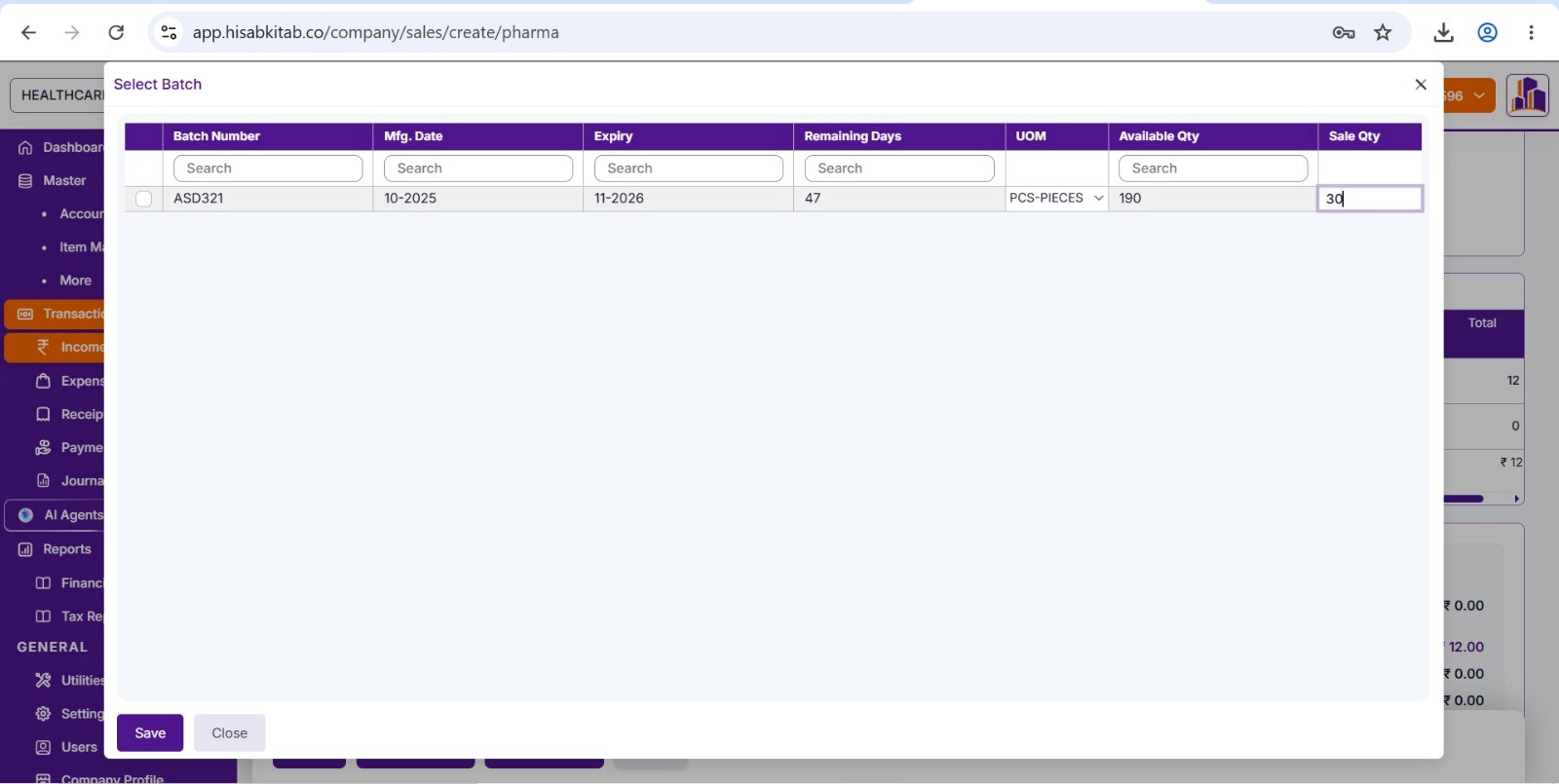
Step 4 — Near-Expiry Return to DistributorWhen an alert tells you a batch is nearing expiry and you decide to return it:
Go to Purchase Returns in hisabkitab
Select the distributor
Select the near-expiry batch
Enter quantity being returned
hisabkitab generates a purchase return note with batch number, expiry date, and original purchase reference
The ITC on the original purchase is also reversed in your books — so your GSTR-3B reflects the correct ITC after the return.
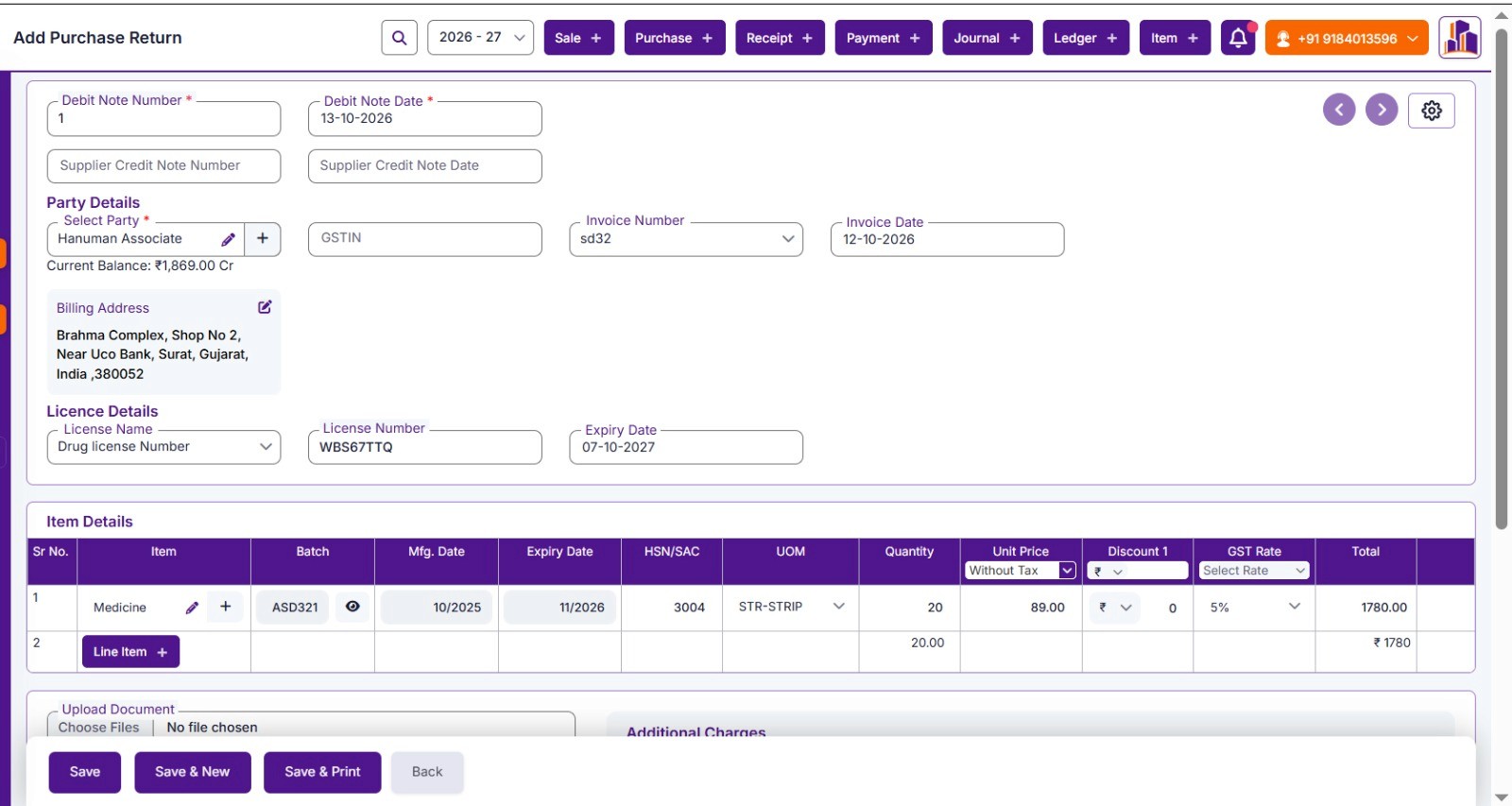
Step 5 — Batch Register Report (For Drug Inspector Visits)At any time — including when a drug inspector walks in unannounced — you can pull the batch register report from hisabkitab:
Go to Reports → Batch Register
Filter by medicine name, batch number, date range, or Schedule category
Print or show on screen — full batch-wise purchase and sale history
The Near-Expiry Return Process — GST and Accounting TreatmentThis is where most medical shop owners make accounting mistakes — and lose money without realising it.
When you return near-expiry medicines to your distributor:
Step 1 — The distributor gives you a credit note This reduces the amount they owe you (or adjusts your next purchase invoice).
Step 2 — You must reverse the ITC on the returned medicines When you originally bought the medicines, you claimed ITC on the GST paid. When you return them, that ITC must be reversed in your GSTR-3B — because you are no longer the recipient of those goods.
Step 3 — The correct accounting entry
Original purchase entry:
Dr. Purchases ₹10,000
Dr. Input GST (ITC) ₹500 (at 5%)
Cr. Distributor payable ₹10,500
Return entry:
Cr. Purchases ₹10,000 (reversal)
Cr. Input GST (ITC) ₹500 (ITC reversed)
Dr. Distributor payable ₹10,500
What most medical shops do wrong: They record the credit from the distributor as income or as a purchase reduction without reversing the ITC. This creates a GSTR-2B mismatch and an ITC overclaim which triggers a demand notice.
What hisabkitab does: When you raise a purchase return in hisabkitab, the ITC reversal is automatic. Your GSTR-3B reflects the correct net ITC after returns without you doing any manual calculation.

Common Batch Tracking Mistakes Indian Medical Shops MakeMistake 1: Entering the batch number only on purchase not on sale
The most common error. Batch tracking requires recording at both ends. Without the sale-side batch record, you cannot trace which customer received which batch during a recall.
Fix: hisabkitab enforces batch entry on sales — you cannot complete a sale without the batch being selected.
Mistake 2: Manually typing batch numbers instead of scanning
Manual batch entry = typographical errors. BT2024071 becomes BT2024710. Your batch register has ghost entries — batches that don't exist, batches with wrong quantities.
Fix: hisabkitab supports barcode scanning on purchase entry. The batch number scans directly from the medicine packaging — no manual typing, no errors.
Mistake 3: Using FIFO instead of FEFO
Selling from the first-purchased batch instead of the first-expiring batch. Results in later-purchased stock with earlier expiry being left behind until it expires.
Fix: hisabkitab auto-selects FEFO at point of sale — the earliest-expiring batch is always selected first.
Mistake 4: Mixing batches of the same medicine in one shelf location
Without physical separation by batch, counter staff pick from whichever batch is easiest to reach not the earliest-expiring one. The software shows FEFO but the physical reality doesn't follow it.
Fix: Physically label shelves by batch with the expiry date visible on the shelf edge. hisabkitab's batch reports show which batches need physical relocation (earliest expiry to the front).
Mistake 5: Not recording the batch on Schedule H drug register separately
Your billing software batch records and your physical Schedule H register must match. Many shops record in software but forget the physical register — or vice versa.
Fix: hisabkitab's batch register report serves as the digital equivalent of the Schedule H register. Print it monthly or on demand for drug inspector visits.
Mistake 6: Returning expired stock (not near-expiry) to distributors
Most distributors will not accept stock that has already expired. Near-expiry returns must happen before expiry ideally at the 1–3 month mark.
Fix: hisabkitab's 90-day expiry alert gives you enough lead time to contact the distributor and arrange the return before the stock expires.
Batch Tracking Compliance Calendar Monthly Tasks
Task
When
What to Do
Check 90-day expiry alert
1st of every month
Review all medicines expiring within 90 days — assess which need action
Initiate near-expiry returns
When batch hits 60-day alert
Contact distributor, confirm return policy, raise purchase return
Physical shelf check
Every 2 weeks
Verify front-of-shelf stock matches earliest-expiring batch (FEFO check)
Batch register review
Before 11th (before GSTR-1)
Confirm all batch entries are complete for the previous month
Drug inspector readiness check
Quarterly
Pull batch register report from hisabkitab — verify completeness
Expired stock disposal
Immediately when identified
Remove from shelf, document, arrange destruction per Drugs and Cosmetics Rules
Frequently Asked Questions
The Bottom LineBatch tracking and expiry management are not administrative tasks. They are the financial and legal backbone of a compliant medical shop.
Every batch of medicine that expires without being returned to the distributor in time is a 100% write-off. Every sale without a batch record is a potential compliance violation. Every drug recall without batch tracking is a two-day crisis instead of a one-hour resolution.
hisabkitab builds all of this automatically into your daily billing workflow:
Batch number recorded on every purchase and sale
FEFO applied at point of sale — automatically
Expiry alerts at 90, 60, and 30 days — on your dashboard and WhatsApp
Near-expiry return documentation — with ITC reversal handled automatically
Batch register report — inspector-ready at any time
Starting at ₹2,999/year — less than ₹250/month.
The first prevented expiry return pays for the software multiple times over.
📲 Book your free hisabkitab demo — see batch tracking live: hisabkitab.co Our team will walk you through batch entry, expiry alerts, FEFO billing, and the near-expiry return process in 20 minutes — in your specific medical shop workflow.
Continue Reading
