




Selling on Amazon or Flipkart is the easy part.
You list the product. The orders come in. The ratings go up. And then the settlement hits your bank — and it's ₹40,000 less than you expected.
Where did the money go?
This is the question every e-commerce seller in India asks — and the answer is buried inside commission deductions, FBA fees, TCS, TDS, shipping charges, advertising fees, and return adjustments, all mixed together in a settlement report that looks nothing like your actual sales.
Recording that settlement amount as revenue is the single biggest accounting mistake Indian e-commerce sellers make. And it cascades: wrong revenue means wrong GST liability, wrong GSTR-3B, wrong profit calculation, and eventually a notice from the GST department asking why your GSTR-1 and your bank deposits don't match.
This guide covers everything — GST registration, TCS, TDS, settlement reconciliation, returns, multi-platform accounting, and how hisabkitab automates the entire process. Written by a CA who has worked with Indian e-commerce sellers across Amazon, Flipkart, and Meesho.
Verify your GST before filing: hisabkitab.co/gst-calculator-online
Why E-Commerce Accounting Is Different from Regular Business Accounting
If you run a physical shop, your accounting is straightforward: you sell something, you collect the money, you record the sale, you pay GST.
E-commerce doesn't work like that. Here's why:
1. GST is mandatory from your very first sale — no threshold Regular businesses only need GST registration after crossing ₹40 lakh annual turnover (₹20 lakh in special category states). E-commerce sellers are different. Under Section 24(ix) of the CGST Act 2017, marketplace sellers must register for GST regardless of turnover. You cannot even list on Amazon or Flipkart without a GSTIN.
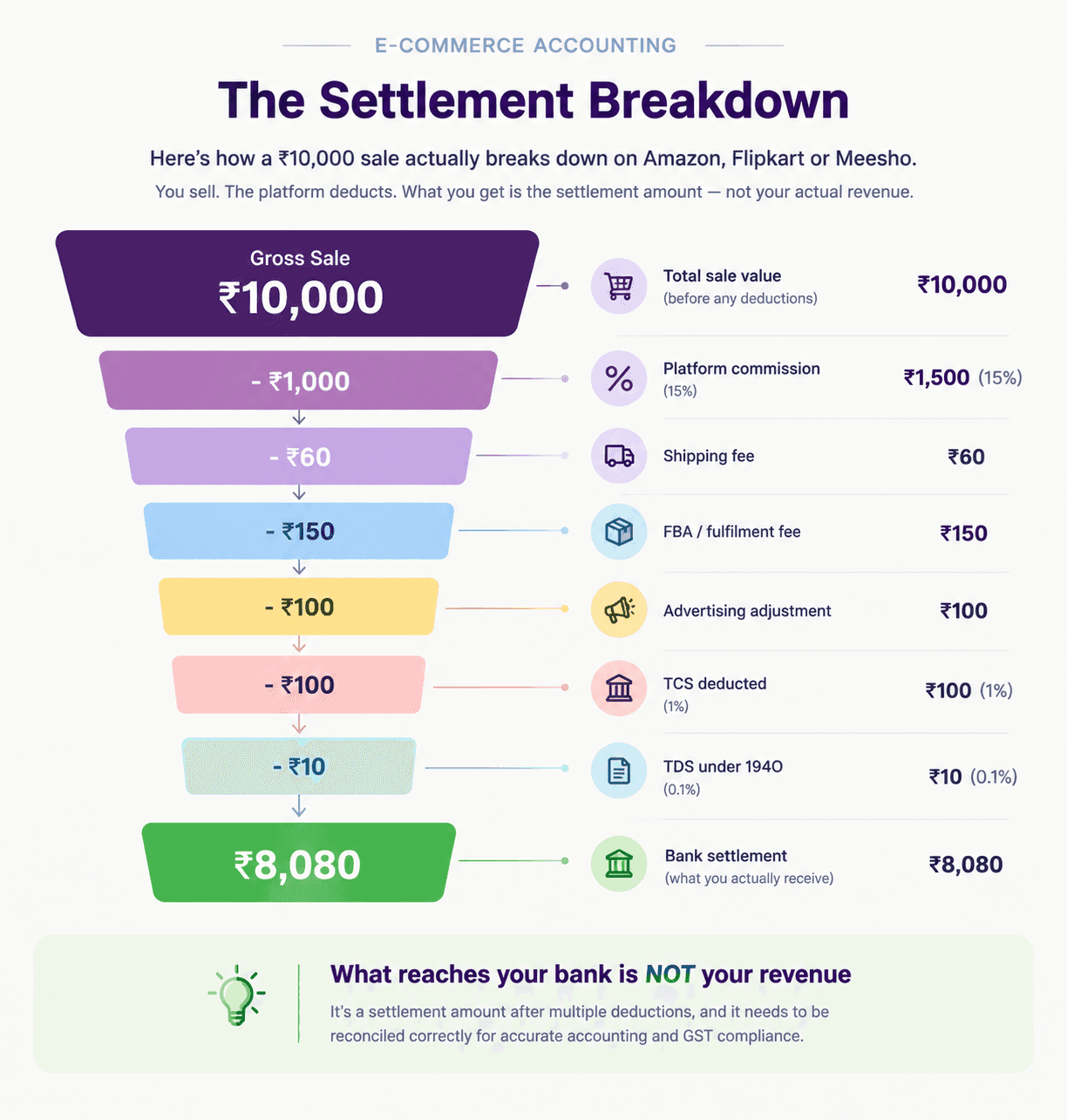
2. The platform deducts money before paying you — and you need to account for it correctly Amazon, Flipkart, and Meesho deduct TCS (Tax Collected at Source), commissions, shipping fees, FBA fees, advertising charges, and return adjustments before depositing money in your account. What reaches your bank is not your revenue.
3. You have two tax deductions happening simultaneously — TCS and TDS TCS is under GST law (Section 52 CGST Act). TDS is under Income Tax (Section 194O). Both are deducted by the platform. Both must be claimed separately — TCS in your GSTR-3B, TDS in your Income Tax Return.
4. Returns create a compliance burden unique to e-commerce A fashion seller with 30% returns has to issue credit notes for every return and report them in GSTR-1 as negative supplies. Skip this and your GSTR-1 shows higher sales than actual — creating a mismatch that triggers automated DRC-01C notices.
5. Multi-platform means multi-report, multi-reconciliation Three platforms = three settlement reports in three different formats. Each must be reconciled separately and then consolidated for GST filing. A single formula error in your Excel reconciliation creates a compliance problem across all three returns.
Part 1: GST Registration for E-Commerce Sellers
Why you cannot skip GST registration
Section 24(ix) of the CGST Act 2017 overrides the normal turnover threshold completely for e-commerce sellers. This is not a grey area.
Amazon verifies your GSTIN against the GSTN database at onboarding — an invalid GSTIN deactivates your seller account without warning
Flipkart and Meesho do the same
Selling even one product on a marketplace without GST registration is non-compliant — regardless of whether you've sold ₹100 or ₹10 crore
The consequences of no GST registration:
Platform account suspension — immediate and without notice
Loss of ITC on all business expenses: packaging, shipping, inventory, advertising — every rupee of GST paid on these is unrecoverable without registration
In 2026, the GSTN portal uses AI-based matching to flag mismatches in real time. What took months to catch is now flagged within days
Penalty under Section 122 CGST Act: ₹10,000 or 100% of tax due — whichever is higher
Multi-state GST — the FBA trap
If you use Amazon FBA (Fulfilment by Amazon), your goods may be stored in Amazon warehouses across multiple states — Bangalore, Mumbai, Delhi, Hyderabad — even if you're based in one state.
When goods stored in Amazon's Bangalore warehouse are sold to a buyer in Delhi, that's an inter-state supply. It attracts IGST. But it's being shipped from Karnataka, not your home state.
Here's the trap: you may need GST registration in every state where Amazon warehouses your goods. Most new FBA sellers don't know this. They register only in their home state, enrol in pan-India FBA, and create a compliance gap that is expensive to fix retroactively — often requiring backdated registration, amended returns, and interest on delayed GST payments.
Check list before enrolling in FBA:
Find out which Amazon fulfilment centres your inventory will be stored in
Check if those states require separate GST registration for your business
Consult your CA before activating pan-India FBA
Part 2: TCS — What It Is, What Gets Deducted, and How to Get It Back
This is the most commonly misunderstood part of e-commerce accounting in India. And it is costing sellers real money every month.
What is TCS?
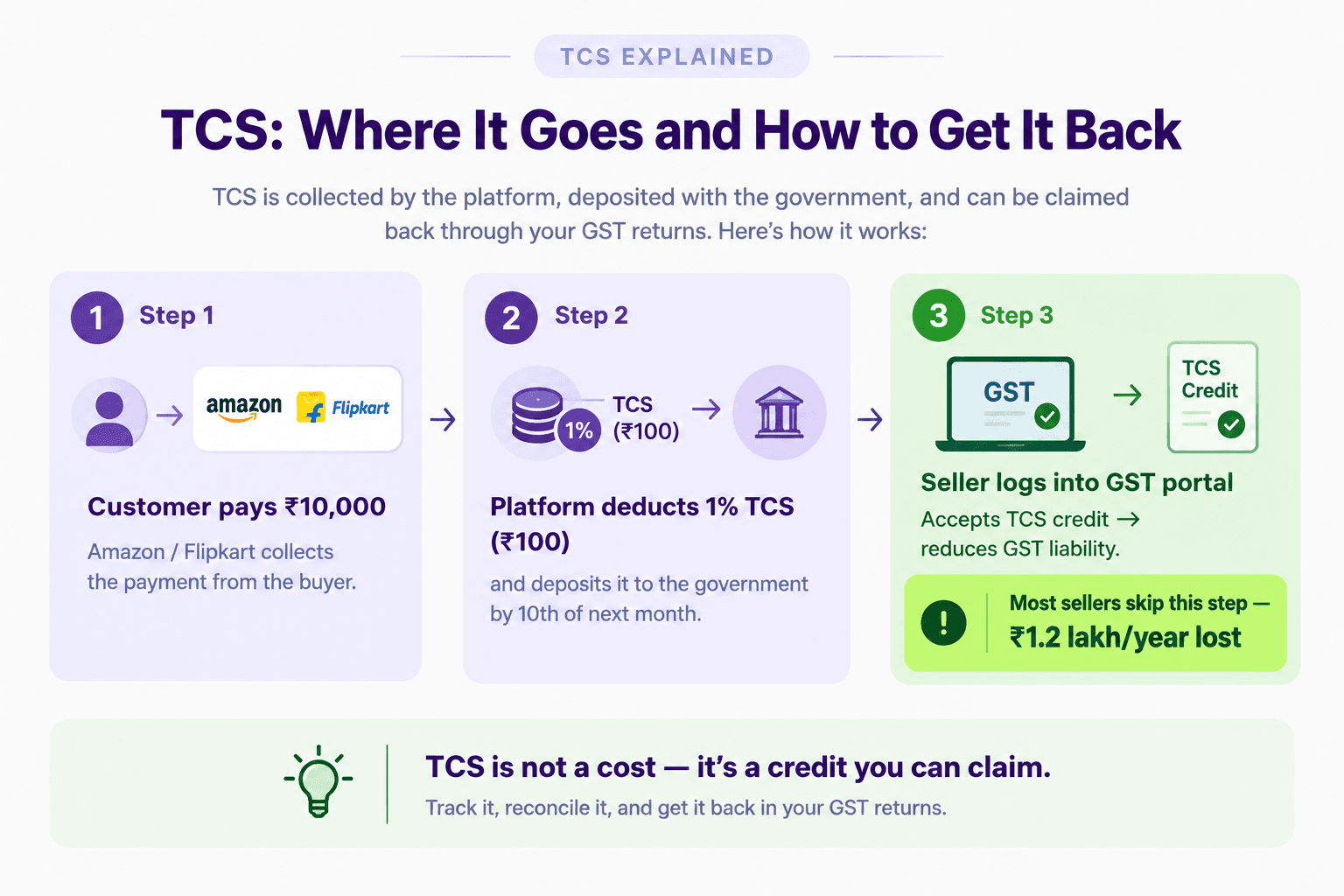
TCS stands for Tax Collected at Source. Under Section 52 of the CGST Act 2017, every e-commerce marketplace (Amazon, Flipkart, Meesho) is legally required to deduct 1% of your net taxable sales before paying you.
Rate: 1% (0.5% CGST + 0.5% SGST for intra-state; 1% IGST for inter-state)
Deducted by: the platform, not you
Deposited to: the government by the 10th of the following month
Your TCS credit appears in: your Electronic Cash Ledger on the GST portal
The money is not lost — but many sellers never claim it
TCS is not an expense. It is a tax credit. The platform deposits it to the government on your behalf, and you can use it to offset your GST liability.
But here is the step that thousands of Indian sellers miss every month:
You have to go to the GST portal → Services → Returns → TDS and TCS Credit Received → and manually click "Accept" for each period.
Until you click that button, the TCS credit sits in a government account — unclaimed. Unused. Every month.
The math on unclaimed TCS:
Monthly GMV: ₹10,00,000
TCS deducted at 1%: ₹10,000/month
Annual unclaimed TCS (if never accepted): ₹1,20,000
Across India, a significant volume of TCS credit from e-commerce sellers remains unclaimed — not because of a system error, but because sellers don't know this one step exists.
Once accepted, TCS credit reduces your GSTR-3B liability directly. If your monthly GST liability is ₹40,000 and your TCS credit is ₹10,000, you only pay ₹30,000 in cash.
How to record TCS in your accounts
TCS is recorded as a receivable (asset) — not as an expense.
Wrong entry (what most sellers do): Dr. Bank Account ₹8,080 Cr. Sales ₹8,080 (Settlement amount recorded as revenue — understates sales, understates GST)
Correct entry: Dr. Bank Account ₹8,080 Dr. TCS Receivable ₹100 (the 1% deducted) Dr. TDS Receivable ₹10 (the 0.1% under 194O) Dr. Commission Expense ₹1,500 Dr. FBA Fee Expense ₹150 Dr. Shipping Fee ₹60 Dr. Advertising Expense ₹100 Cr. Sales ₹10,000 (gross sales ex-GST) Cr. GST Payable ₹1,800 (18% on ₹10,000)
This is the accounting entry that correctly reflects your sales, your GST liability, your TCS credit, and the platform fees — all from a single settlement.
Part 3: TDS Under Section 194O — The Second Deduction
In addition to TCS under GST, there is a second tax deduction happening on your sales: TDS under Section 194O of the Income Tax Act.
TCS | TDS | |
Full form | Tax Collected at Source | Tax Deducted at Source |
Law | Section 52, CGST Act 2017 | Section 194O, Income Tax Act |
Rate | 1% of net taxable sales | 0.1% of gross sales |
Deducted by | E-commerce platform | E-commerce platform |
Claim in | GSTR-3B (GST Return) | Income Tax Return (ITR) |
Purpose | GST advance | Income Tax advance |
On ₹10,00,000 monthly GMV:
TCS deducted: ₹10,000 (claim in GST)
TDS deducted: ₹1,000 (claim in ITR)
Total upfront deductions: ₹11,000/month = ₹1,32,000/year
Both must be tracked separately in your accounts, claimed through separate channels, and reconciled against platform reports monthly.
Part 4: The Settlement Reconciliation Problem
This is where most e-commerce sellers lose hours every month and still end up with wrong numbers.
What a settlement report actually contains
When Amazon or Flipkart deposits money in your account, the settlement report contains:
Gross product sales (your actual revenue)
GST collected from customers (not your money — must be paid to government)
Less: Platform commission (5–30% depending on category)
Less: GST on commission at 18% (but this is your ITC — recoverable)
Less: FBA/fulfilment fees
Less: Shipping fees
Less: Advertising spend
Less: Return adjustments
Less: TCS (1%)
Less: TDS (0.1%)
Plus: Any reimbursements (damaged inventory, lost shipments)
= Net settlement amount (what reaches your bank)
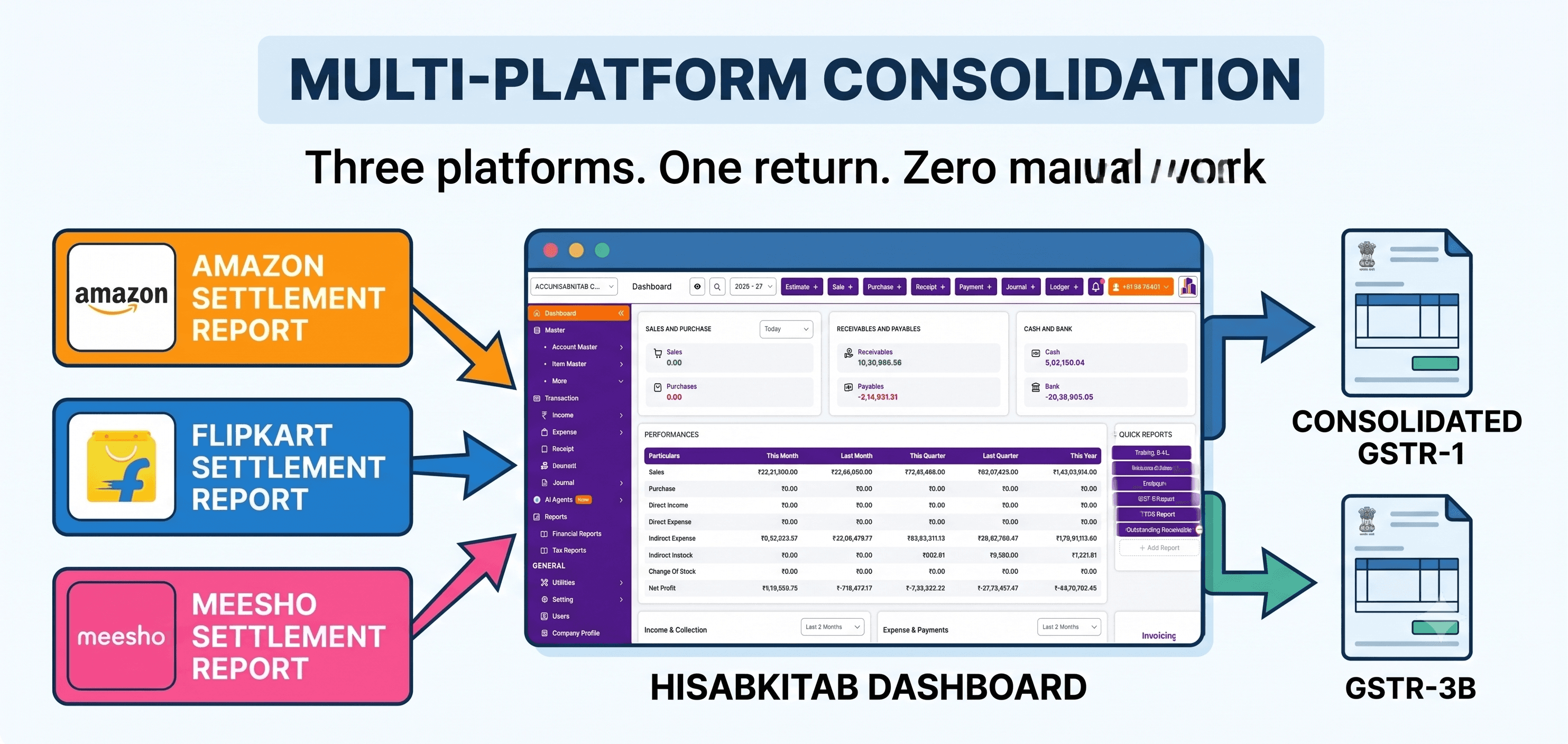
Flipkart splits a single order's payout across two settlement dates and scatters the data across five to eight different reports. Amazon uses the MTR (Monthly Tax Report) which has thousands of rows sorted by state and tax rate. Meesho has its own format entirely.
None of these formats maps directly to GSTR-1 tables. You have to do the translation — or use software that does it automatically.
The clearing account method — how professional e-commerce accountants do it
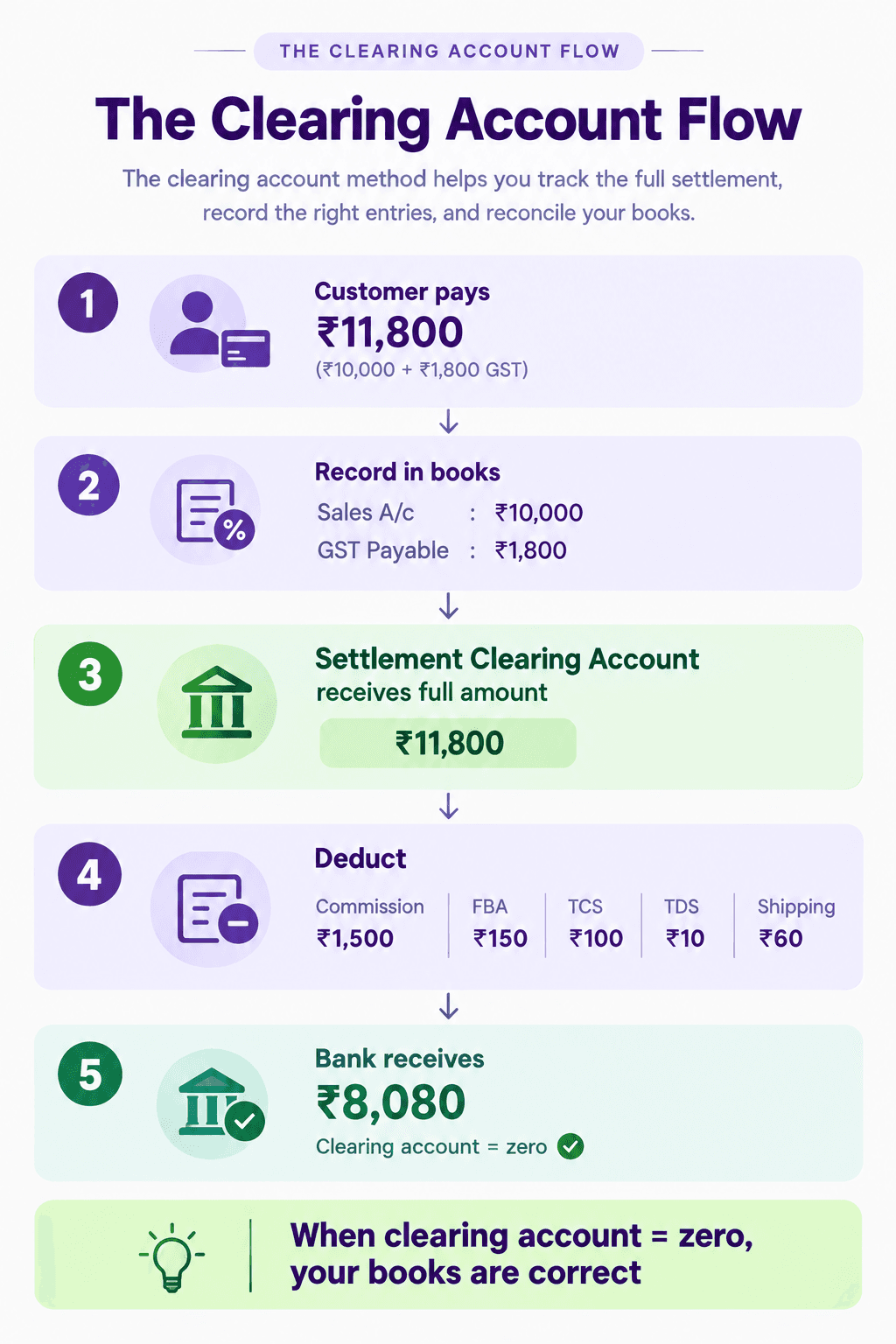
The correct approach uses a settlement clearing account:
Record gross sales at full invoice value (including GST collected)
Record customer payment into the clearing account (not directly to bank)
Post a settlement journal entry deducting commission, fees, TCS, TDS, returns
Match the net bank payout against the clearing account balance
When the clearing account nets to zero — your reconciliation is complete
When done correctly:
Your sales figure is accurate (gross, not net)
Your GST liability is correct
Your TCS and TDS are tracked as receivables
Your platform fees are recorded as deductible expenses
Your profit is real
Part 5: Handling Returns — The Compliance Trap
Returns are a unique challenge for e-commerce sellers because they directly affect your GST returns — and skipping the accounting step creates an automatic compliance problem.
What happens when a customer returns a product
The platform reverses the sale in their system
Your settlement report shows a negative entry for the return
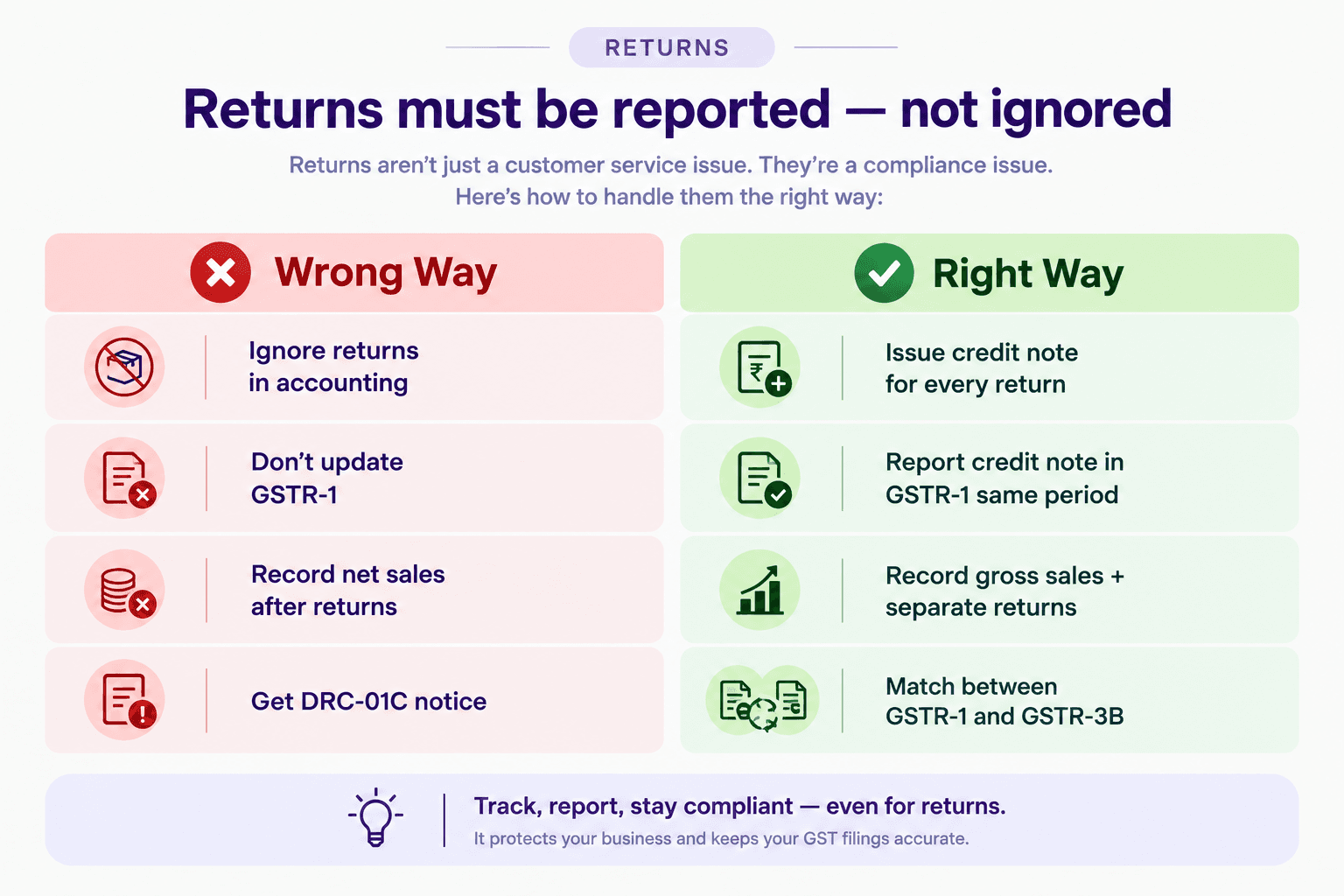
You must issue a credit note for the returned item
That credit note must be reported in GSTR-1 as a negative supply
GSTR-3B must reflect the reduced taxable sales
What happens if you skip the credit note in GSTR-1: Your GSTR-1 shows ₹10,00,000 in sales. Your bank deposits (after returns) reflect ₹8,50,000 in effective sales. The GST portal sees the mismatch. DRC-01C notice follows automatically.
The timing rule: Credit notes must be reported in the same period as the return, or the period immediately following. You cannot accumulate and report them quarterly if you're a monthly filer.
The high-return category problem: A fashion seller with 30% monthly returns on ₹10 lakh GMV has ₹3 lakh in returns to process every month — that's hundreds of credit notes. Manual credit note creation is simply not sustainable. Automation is not optional at this volume.
Part 6: Multi-Platform Accounting — Amazon + Flipkart + Meesho Together
If you sell on more than one platform, your accounting complexity multiplies.
Each platform:
Has its own settlement report format
Has its own fee structure
Deposits on its own settlement cycle (Amazon: bi-weekly; Flipkart: weekly; Meesho: weekly)
Deducts TCS separately against your GSTIN
Has its own return and cancellation process
What consolidation looks like without automation:
Day 1–5: Download Amazon MTR, Flipkart settlement report, Meesho payout report Day 5–8: Map each to a common format in Excel Day 8–10: Reconcile each platform's TCS against GST portal Day 10: Total all platforms for GSTR-1 preparation Day 11: File GSTR-1 (deadline — no room for error) Day 11–18: Reconcile GSTR-2B for ITC on commission invoices Day 20: File GSTR-3B
This is a 20-day compliance marathon every month — for just the GST side of things.
The common mistakes in multi-platform accounting:
Recording each platform's settlement separately instead of consolidated gross sales for GSTR-1
Missing TCS credit from one platform because it was filed under a different GSTIN
Double-counting returns that appear in one platform's report but are credited in the next month's settlement
Missing commission invoices from one platform in GSTR-2B (losing ITC)
Part 7: ITC on Platform Fees — The Credit Most Sellers Miss
Amazon, Flipkart, and Meesho charge commission, FBA fees, and other services — and they charge 18% GST on those fees. This is your Input Tax Credit.
Example:
Monthly commission paid to Amazon: ₹1,50,000
GST on commission at 18%: ₹27,000
This ₹27,000 is claimable as ITC in your GSTR-3B
Amazon and Flipkart raise GST invoices for their fees. These appear in your GSTR-2B. If you don't reconcile your GSTR-2B and claim this ITC, you're overpaying GST by ₹27,000 every month — ₹3,24,000 per year on this example alone.
What to check:
Amazon Seller Central: commission invoices appear under "Payments → Tax Document Library"
Flipkart Seller Hub: under "Finance → Tax Invoices"
These must match what appears in your GSTR-2B — if the platform didn't file their GSTR-1 for a period, the invoices won't appear and your ITC is at risk for that month
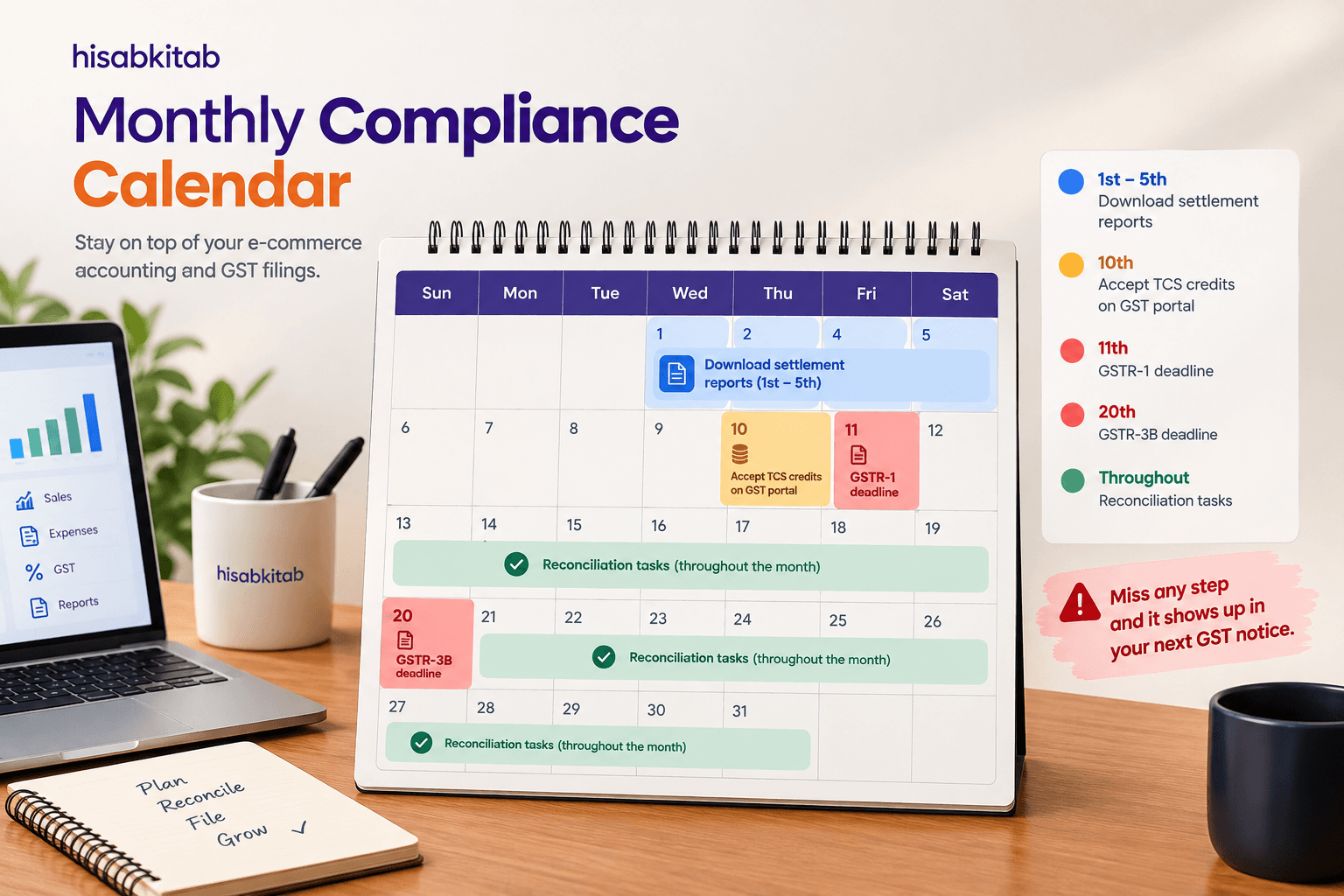
Part 8: Monthly E-Commerce Accounting Calendar
Here is the exact sequence every e-commerce seller should follow every month:
Date
Task
1st–5th
Download settlement reports from all platforms for previous month
1st–5th
Download Amazon MTR, Flipkart tax report, Meesho payout summary
5th–8th
Reconcile each platform's settlement using clearing account method
8th–10th
Go to GST portal → accept TCS credits from all platforms
8th–10th
Check GSTR-2B for platform commission invoices — verify ITC
10th
Verify all credit notes for returns are recorded and mapped
10th–11th
Prepare GSTR-1 — consolidated across all platforms
11th
File GSTR-1 — deadline
11th–18th
Reconcile GSTR-2B for all supplier and platform ITC
18th–19th
Calculate net GST liability — less TCS credits, less ITC
20th
File GSTR-3B and pay balance GST
25th–30th
Reconcile bank statement against all platform settlements
Last day
Verify inventory levels match accounting records
Part 9: How hisabkitab Handles E-Commerce Accounting Automaticallyhisabkitab's new e-commerce accounting feature is built specifically for Indian marketplace sellers — designed by CAs who understand exactly where the accounting breaks down.
Auto-import of settlement reports Connect your Amazon Seller Central, Flipkart Seller Hub, and Meesho Supplier Panel to hisabkitab. Settlement reports are imported automatically — no manual download, no Excel.
Auto-split of every settlement hisabkitab automatically splits each settlement into its components: gross sales, platform commission, FBA fees, shipping charges, TCS, TDS, advertising, returns, reimbursements. Each line goes to the correct ledger account automatically.
Gross sales recorded correctly hisabkitab always records gross sales (not settlement amount) as revenue — and separately tracks GST collected, ensuring your GSTR-1 figures are always accurate.
TCS auto-reconciled hisabkitab pulls your TCS credits from the GST portal and matches them against platform deductions — showing you exactly what's been accepted and what's pending, and flagging any discrepancies between what the platform deducted and what appeared on the portal.
GSTR-1 auto-prepared from platform data From your consolidated multi-platform sales data, hisabkitab auto-prepares your GSTR-1 — with correct B2B vs B2C classification, state-wise breakup, and return adjustments already factored in.
Credit notes for returns auto-generated Every return flagged in your settlement report generates an automatic credit note in hisabkitab — ready to be reported in GSTR-1. No manual credit note creation, no missed returns.
ITC on commission auto-identified hisabkitab matches your platform commission invoices against GSTR-2B and flags the ITC available — so you never miss ₹27,000 in claimable credit because you didn't check the right column.
GSTR-3B auto-calculated From the same data that prepared GSTR-1, hisabkitab calculates your GSTR-3B — applying TCS credits, ITC on commissions, and net GST payable — in one click.
WhatsApp reminders for D2C channels If you also sell through your own website or take wholesale orders directly, hisabkitab sends automated WhatsApp payment reminders for outstanding invoices.
Try hisabkitab free for 7 days — no credit card required: hisabkitab.co Built by CAs. Trusted by 10,000+ Indian businesses.
Common E-Commerce Accounting Mistakes — Quick Reference
Mistake
Consequence
Fix
Recording settlement amount as revenue
Wrong sales figure, wrong GST liability, GSTR-3B mismatch
Record gross sales; deduct commissions as expenses
Not accepting TCS credits on GST portal
₹1.2 lakh+/year sitting unclaimed
GST portal → TDS and TCS Credit Received → Accept monthly
Ignoring TDS under 194O
ITR filed without claiming advance tax; unnecessary tax outgo
Record TDS as receivable; claim in ITR
Not issuing credit notes for returns
GSTR-1 overstates sales; DRC-01C notice
Issue credit note per return; report in GSTR-1 same period
Missing ITC on platform commission invoices
Overpaying GST by thousands monthly
Check GSTR-2B for Amazon/Flipkart commission invoices
Single-state GST for FBA multi-state operations
Compliance gap in states where goods are warehoused
Register in states where Amazon FBA stores your goods
Using settlement cycle as accounting period
Mismatch between sales period and return period
Use invoice date as accounting date, not settlement date
Continue Reading
