


You just listed your first product on Amazon. Orders are coming in. The business feels real.
Then your CA calls and says: "You need GST registration — from your very first sale."
You say: "But my annual sales will only be ₹3 lakh this year. Isn't the threshold ₹40 lakh?"
Your CA says: "Not for you. You're an e-commerce seller. Different rules apply."
And that's where most new Amazon and Flipkart sellers get their first GST shock.
The second shock comes when they look at their settlement and realise ₹10,000 is missing — deducted as TCS — and they have no idea what it is, where it went, or how to get it back.
The third shock is the GST notice.
This guide eliminates all three. Written by a Chartered Accountant who works with Indian e-commerce sellers daily, it covers every GST rule that applies to marketplace sellers in 2026 — registration, TCS, TDS, GSTR-1 filing, returns, and the exact steps to stay compliant without losing money.
Calculate your GST liability before filing — free: hisabkitab.co/gst-calculator-online
Why E-Commerce Sellers Are Treated Differently Under GST
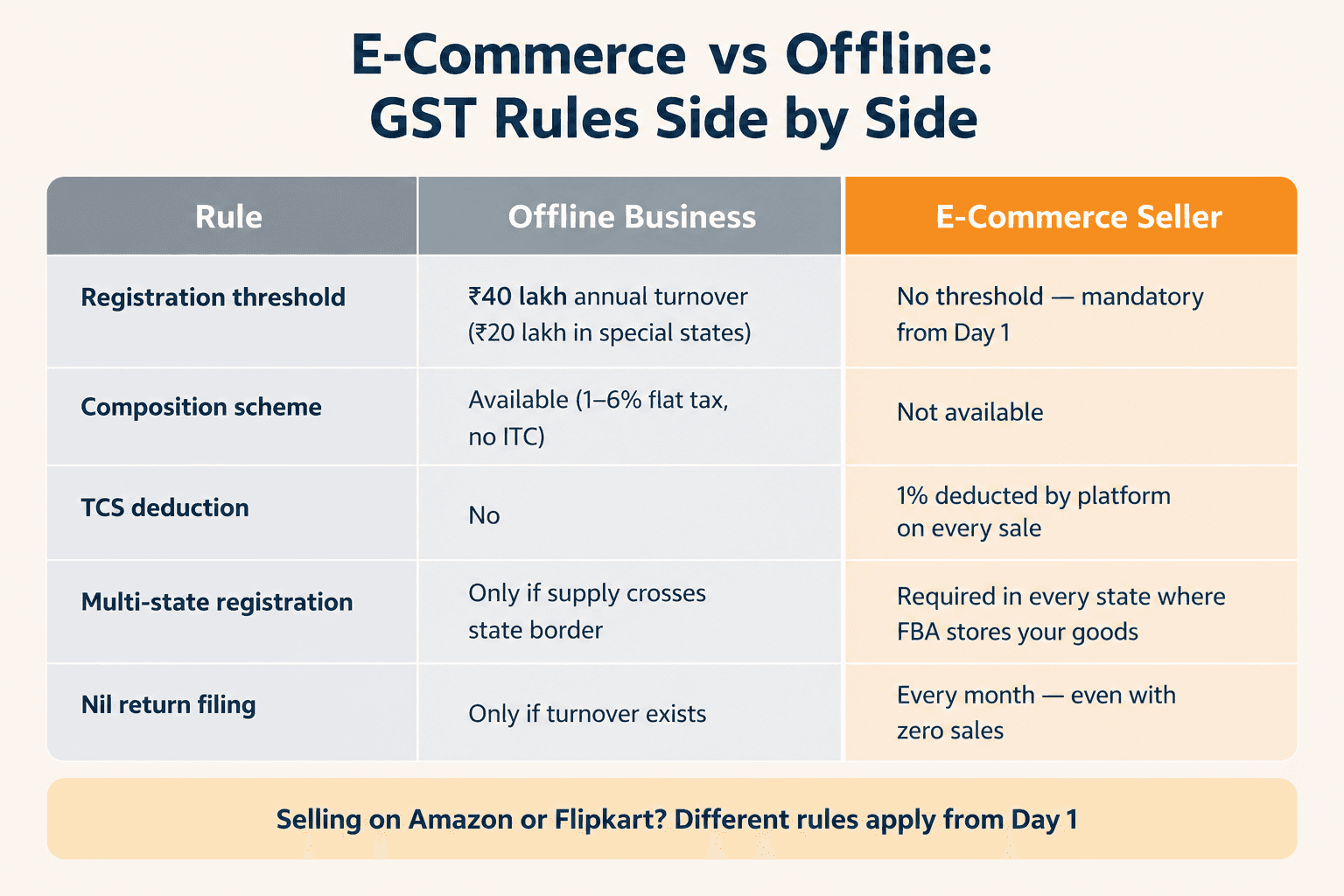
The GST framework has a special category for e-commerce sellers — and it is significantly stricter than the rules for offline businesses.
Here is the core difference:
Rule | Offline Business | E-Commerce Seller |
GST registration threshold | ₹40 lakh annual turnover (₹20 lakh in special states) | No threshold — mandatory from Day 1 |
Composition Scheme | Available (1–6% flat tax, no ITC) | Not available |
TCS deduction | No | 1% deducted by platform on every sale |
TDS deduction | No | 0.1% deducted by platform under Section 194O |
Multi-state registration | Only if supply crosses state border | Required in every state where FBA stores your goods |
Nil return filing | Only if turnover exists | Every month — even with zero sales |
The reason for this stricter treatment is straightforward. When millions of sellers transact through Amazon, Flipkart, or Meesho, the government collects tax more efficiently at the platform level rather than monitoring each individual seller. This is the framework under Section 9(5) and Section 52 of the CGST Act 2017.
Part 1: GST Registration — Why It's Mandatory from Your First Sale
The law — Section 24(ix) CGST Act 2017
Section 24(ix) of the Central Goods and Services Tax Act 2017 states that every person who supplies goods or services through an e-commerce operator that is required to collect TCS must be registered under GST — regardless of their annual turnover.
This is not a grey area. There is no minimum sales amount. There is no grace period. From the first product you sell on Amazon or Flipkart, you are required to have a valid, active GSTIN.
What happens without GST registration:
Amazon verifies your GSTIN against the GSTN live database at onboarding. An invalid or missing GSTIN means account suspension — immediately and without warning
Flipkart does the same — GSTIN verification is mandatory before your first listing goes live
Any sales made before registration are non-compliant — penalty under Section 122 CGST Act: ₹10,000 or 100% of the tax amount, whichever is higher
All ITC on your business expenses (packaging, inventory, advertising, courier) is permanently lost for the unregistered period — unrecoverable even after you register
Who qualifies for the exemption?
A narrow exemption exists: if you sell only GST-exempt goods (certain agricultural products, unbranded food items), you may not need GST registration even as an e-commerce seller. But confirm this with your CA for your specific product category — this exemption is narrow and frequently misunderstood.
Documents needed for GST registration
PAN card
Aadhaar card
Bank account details (cancelled cheque or passbook)
Business address proof
Photograph
Email ID and mobile number linked to Aadhaar
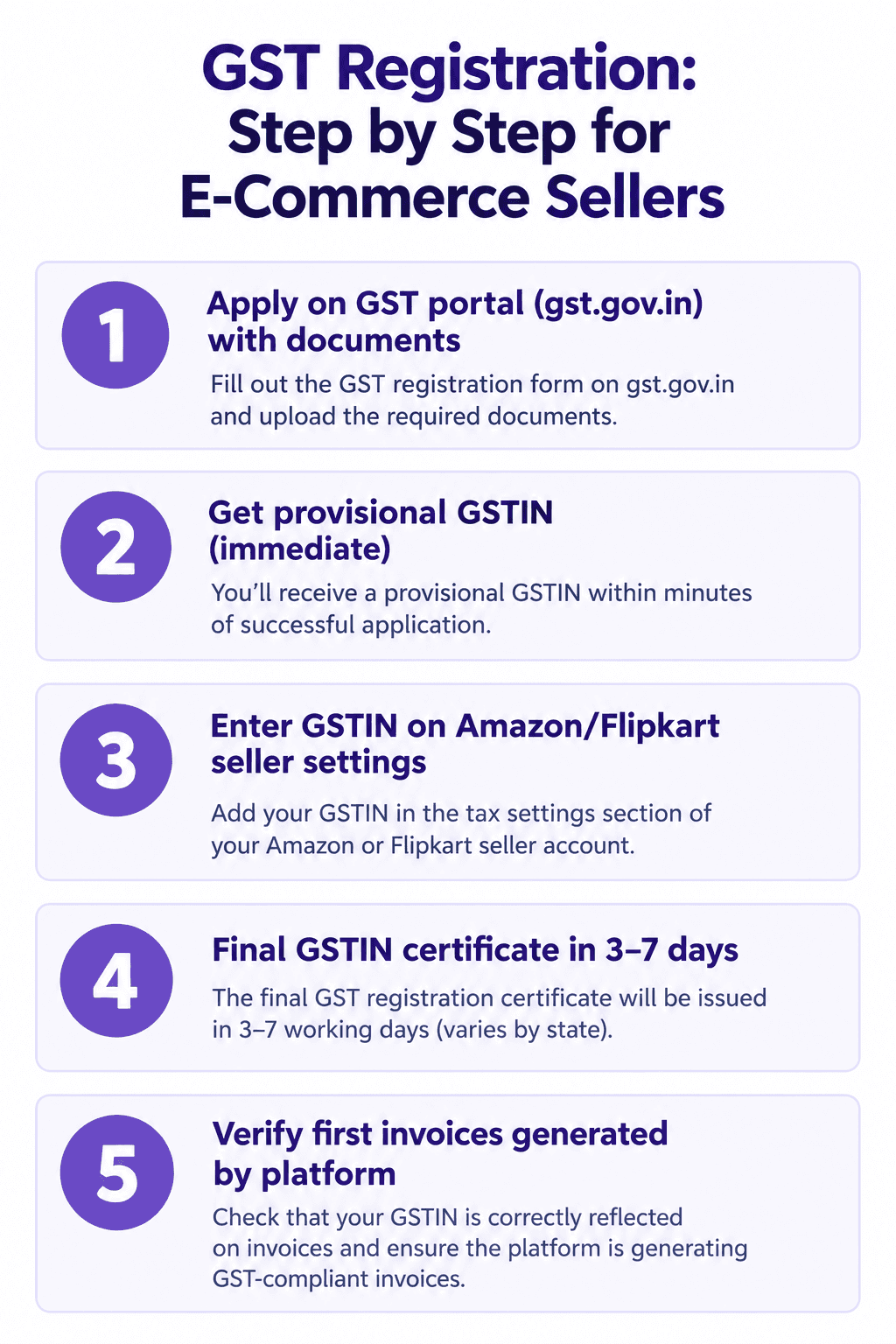
Timeline: Registration certificate issued in 3–7 working days in most states. Provisional GSTIN issued immediately on application — which you can use for marketplace onboarding while the final certificate is being processed.
What to do with your GSTIN after registration
Registration is not enough. You must:
Log into Amazon Seller Central → Settings → Tax Settings → Enter your GSTIN
Do the same on Flipkart Seller Hub → Account → Tax Information
Verify the first 3–5 invoices generated by the platform to ensure your GSTIN and state of supply are appearing correctly
Set up your HSN codes for every product in your catalogue — the platform uses these to calculate the correct GST rate
Part 2: TCS — The 1% Deduction That Most Sellers Never Claim Back
What is TCS?
TCS stands for Tax Collected at Source. Under Section 52 of the CGST Act 2017, every e-commerce marketplace — Amazon, Flipkart, Meesho, Myntra, Snapdeal — must collect 1% of your net taxable sales before paying you.
Rate: 1% (0.5% CGST + 0.5% SGST for intra-state; 1% IGST for inter-state)
Calculated on: Net taxable value (sales value excluding GST — not on the full invoice amount)
Deducted by: The platform
Deposited to: The government by the 10th of the following month via GSTR-8
Appears in: Your Electronic Cash Ledger on the GST portal
TCS is not an expense — it is your money sitting with the government
This is the most important thing to understand about TCS. It is not a cost. It is an advance tax deposit the platform makes on your behalf. You get every rupee back when you file your GSTR-3B — but only if you take one specific action on the GST portal.
The ₹1.2 lakh/year that sellers leave on the table
Here is a real calculation:
Monthly GMV | TCS at 1% | Annual TCS |
₹2,00,000 | ₹2,000/month | ₹24,000/year |
₹5,00,000 | ₹5,000/month | ₹60,000/year |
₹10,00,000 | ₹10,000/month | ₹1,20,000/year |
₹25,00,000 | ₹25,000/month | ₹3,00,000/year |
Across thousands of Indian e-commerce sellers, a significant portion of this TCS sits unclaimed in government accounts — not because of a system error, but because sellers don't know one button exists.
The one step most sellers skip — and how to claim your TCS
Step 1: Log into the GST portal (gst.gov.in) Step 2: Go to Services → Returns → TDS and TCS Credit Received Step 3: Select the tax period (month) Step 4: You will see TCS deposited by Amazon, Flipkart, and Meesho against your GSTIN Step 5: Click "Accept" for each entry Step 6: The accepted TCS credit moves to your Electronic Cash Ledger automatically Step 7: When you file GSTR-3B, this credit offsets your GST liability — reducing your cash payment
Critical: Until you click "Accept," the TCS credit sits in a separate tab — it does NOT automatically apply to your GSTR-3B. Most sellers who skip this step end up paying their full GST liability in cash every month while their TCS credit accumulates unused.
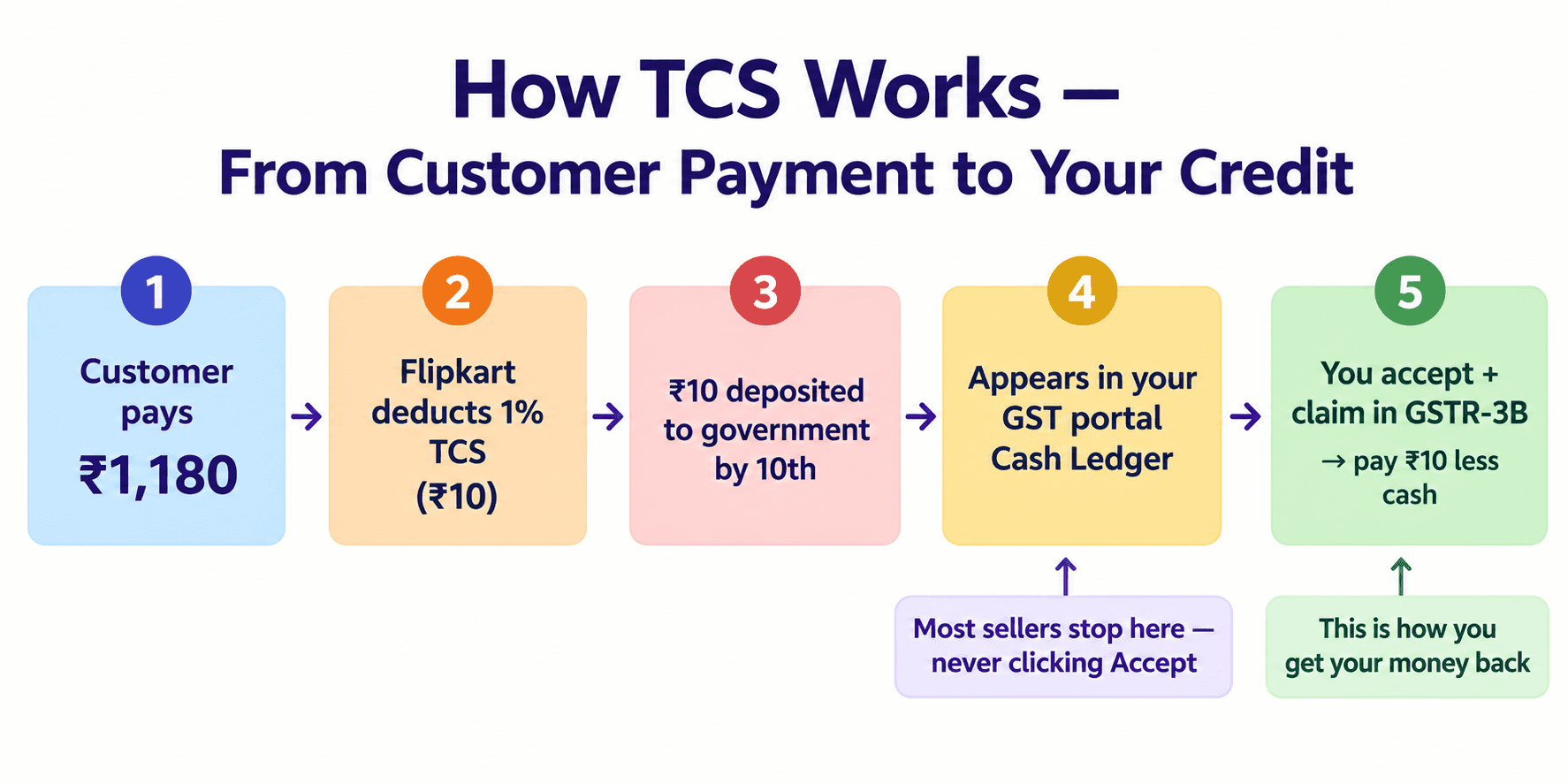
How TCS works — transaction by transaction
Customer buys a product from your Flipkart listing:
Selling price including GST (18%): ₹1,180
Base price (ex-GST): ₹1,000
GST collected from customer: ₹180
Flipkart's TCS calculation:
TCS base: net taxable value = ₹1,000
TCS at 1%: ₹10
Flipkart deducts ₹10 from your payout
What Flipkart does with it:
Deposits ₹10 to the government by 10th of next month
Files GSTR-8 mentioning your GSTIN against this TCS deposit
The ₹10 appears in your GSTR-2A automatically
What you do:
Accept the TCS credit on the GST portal
Claim it in GSTR-3B → reduces your cash GST payment by ₹10
The cash flow trap: You collected ₹180 in GST from the customer. You owe ₹180 to the government. But ₹10 has already been deposited by Flipkart. So your net cash payment is only ₹170. Every month. On every product. This is your money — claim it.
Part 3: TDS Under Section 194O — The Second Deduction
In addition to TCS under GST law, there is a second simultaneous deduction from your e-commerce sales — TDS under the Income Tax Act.
What is TDS under Section 194O?
Section 194O of the Income Tax Act (introduced from 1 October 2020) requires every e-commerce operator to deduct TDS at 0.1% of the gross sales amount before paying you.
TCS (GST) | TDS (Income Tax) | |
Law | Section 52, CGST Act 2017 | Section 194O, Income Tax Act |
Rate | 1% of net taxable value | 0.1% of gross sales |
Deducted by | E-commerce platform | E-commerce platform |
Deposited by platform | By 10th of next month | By 7th of next month |
Appears in | GST portal (Electronic Cash Ledger) | Form 26AS / AIS on Income Tax portal |
Claimed in | GSTR-3B (GST return) | ITR (Income Tax Return) |
Frequency | Monthly | Monthly |
On ₹10,00,000 monthly GMV:
TCS deducted (GST): ₹10,000 — claim in GSTR-3B
TDS deducted (Income Tax): ₹1,000 — claim in ITR
Both are advance tax deposits. Both must be tracked and claimed through separate channels. Missing either means overpaying tax — or worse, filing an ITR without claiming credit and paying unnecessary income tax.
How to track TDS under 194O
Log into the Income Tax portal (incometax.gov.in)
Go to e-File → Income Tax Returns → View Form 26AS
TDS deducted by Amazon, Flipkart, and Meesho under Section 194O appears here
This amount is credited against your income tax liability when you file your ITR
Cross-check Form 26AS against your platform-wise sales to ensure TDS matches your actual sales figures
Part 4: GSTR-1 Filing for E-Commerce Sellers — What's Different
Filing GSTR-1 as an e-commerce seller is more complex than filing for a regular business. Here is what you need to handle correctly.
The Amazon MTR — your source document for GSTR-1
Amazon provides a Monthly Tax Report (MTR) — a downloadable report showing every order, its state of supply, GST rate, taxable value, and tax amount. This is the document you use to prepare your GSTR-1.
The MTR challenge: A seller with 2,000 orders/month has a 2,000-row MTR. It needs to be:
Sorted by state of supply (determines IGST vs CGST+SGST)
Sorted by GST rate (5%, 12%, 18%, 28%)
Returns and cancellations separated and reported as credit notes
B2B orders (Amazon Business) separated from B2C orders
A single wrong formula in your Excel sort creates a GSTR-1 mismatch with Amazon's GSTR-8 — and an automated notice follows.
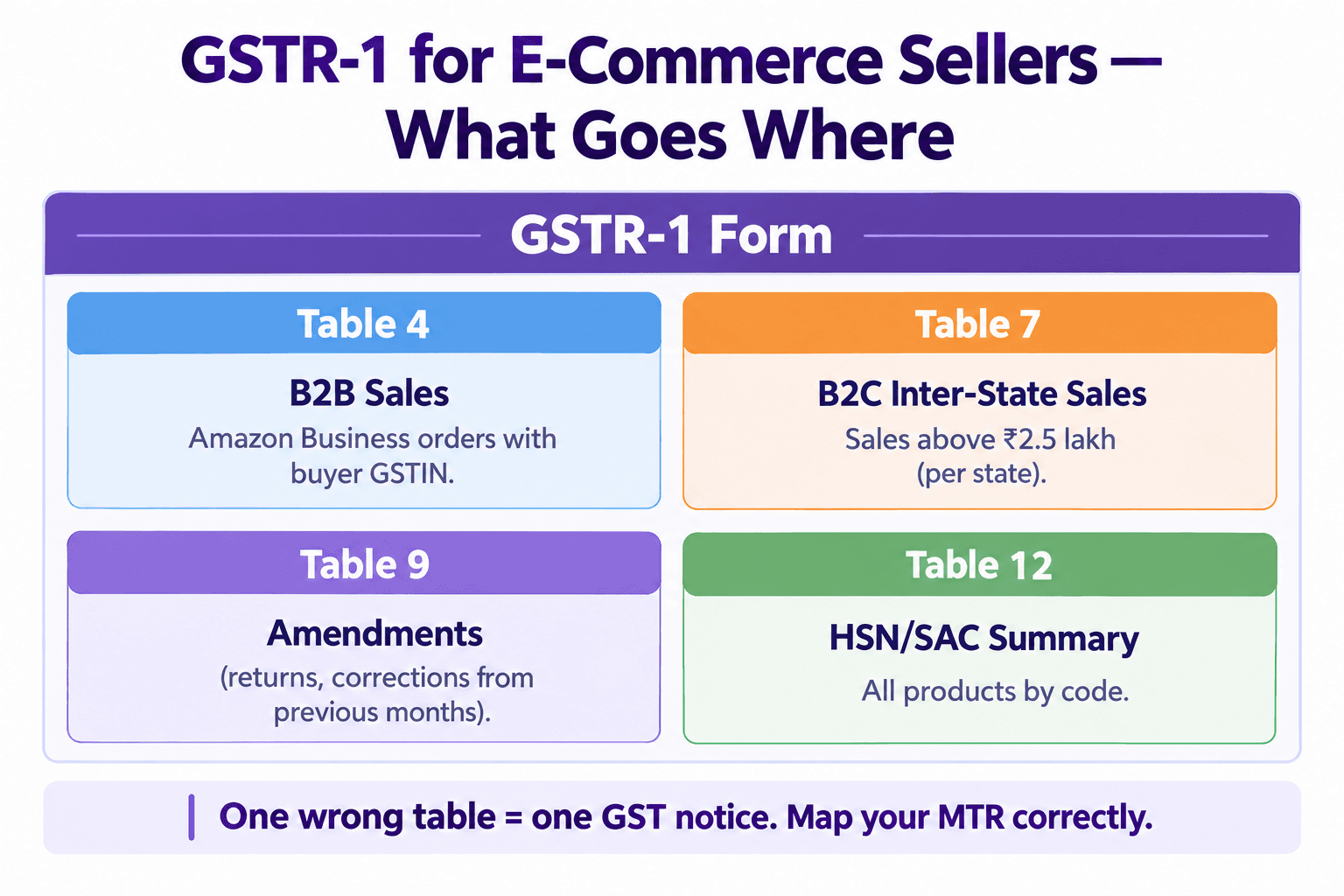
The two GSTR-1 tables e-commerce sellers must fill correctly
Table 4 — B2B invoices (taxable outward supplies to registered persons) Amazon Business orders where the buyer has a GSTIN must be reported here invoice-by-invoice. The buyer can claim ITC only if this table is filled correctly.
Table 7 — B2C supplies (to unregistered persons) — inter-state above ₹2.5 lakh High-value inter-state sales to individual consumers.
Table 9 — Amendments If you amend an invoice from a previous period — due to a return, price correction, or GSTIN error — it goes here.
Table 12 — HSN/SAC summary Summary of all supplies sorted by HSN code. Mandatory in 2026 — the HSN code dropdown (not manual entry) is required for all sellers from January 2025.
The GSTR-8 reconciliation — why your GSTR-1 must match Amazon's filing
Amazon, Flipkart, and Meesho file GSTR-8 every month by the 10th — reporting every seller's total taxable sales and TCS collected against their GSTIN.
The GST portal cross-checks your GSTR-1 outward supply figures against what Amazon reported in their GSTR-8. If they don't match — you receive a notice.
Common causes of GSTR-8 mismatch:
Returns reported in wrong period (customer returned in March, sale was in February — must match which month the platform adjusted GSTR-8)
IGST vs CGST+SGST misclassification — Amazon's GSTR-8 splits TCS by state of supply; your GSTR-1 must use the same classification
Commission credit notes not excluded from gross sales calculation
Inter-state vs intra-state — getting the tax head right
This is a critical step that many sellers get wrong when filing manually.
Intra-state sale (you and buyer are in the same state): CGST + SGST (9% + 9% for 18% products)
Inter-state sale (you and buyer are in different states): IGST (18% for 18% products)
For e-commerce sellers, most sales are inter-state — buyers are distributed across India. If you apply CGST+SGST to an inter-state sale, the tax is in the wrong head. The government can't simply transfer it — you end up with a deficit in one head and a surplus in another, creating demand notices on the deficit side.
Part 5: GSTR-3B — Calculating and Paying Your Net GST Liability
GSTR-3B is your monthly tax payment return. For e-commerce sellers, the calculation involves more offsets than a regular business.
How to calculate your net GST payable
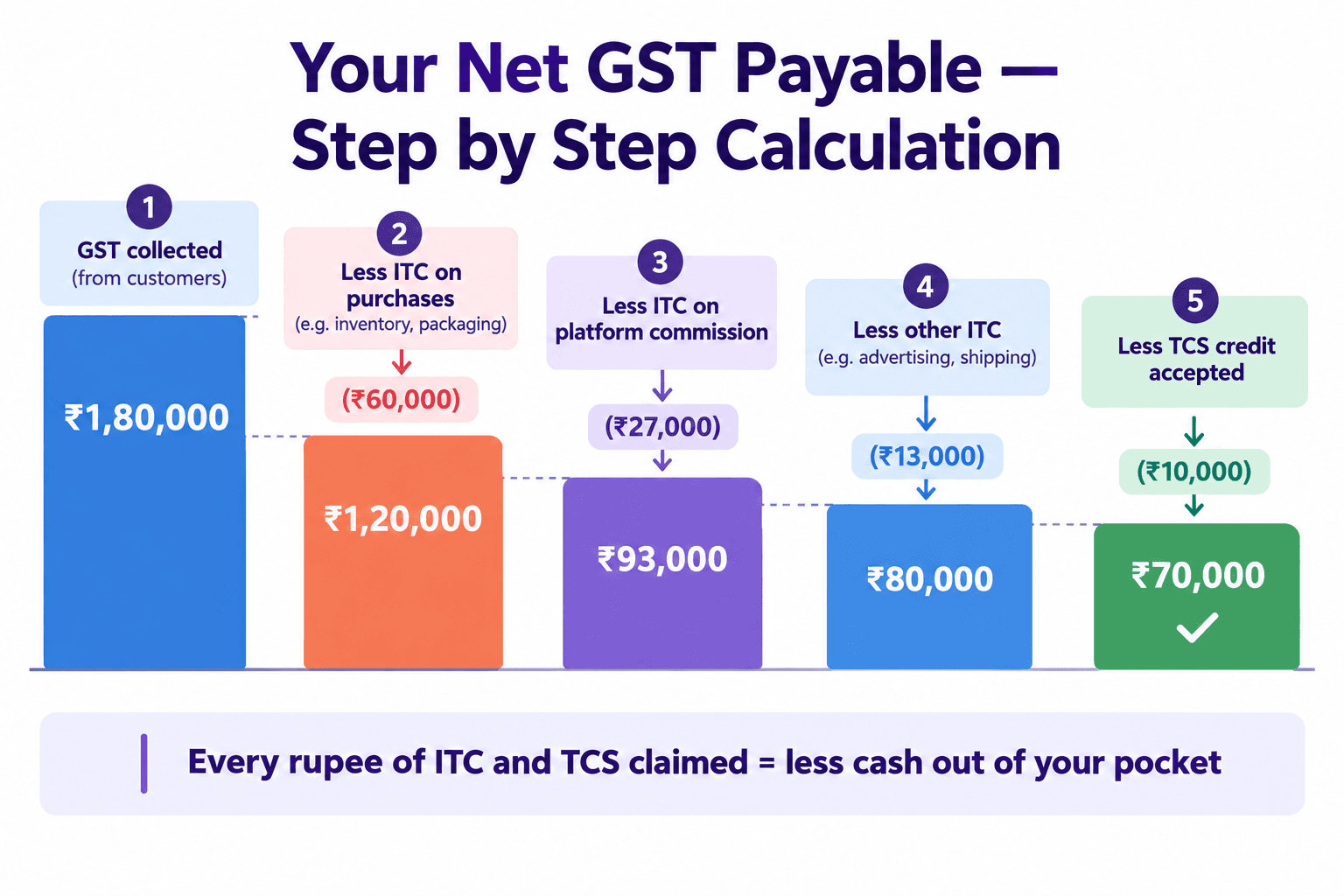
Step 1 — Total GST collected from customers (from GSTR-1 data) Example: ₹1,80,000
Step 2 — Less: ITC on purchases and expenses
ITC on inventory purchases: ₹60,000
ITC on platform commission (18% GST on Amazon/Flipkart commission): ₹27,000
ITC on packaging material: ₹8,000
ITC on advertising: ₹5,000
Total ITC: ₹1,00,000
Step 3 — Net GST liability after ITC ₹1,80,000 - ₹1,00,000 = ₹80,000
Step 4 — Less: TCS credit accepted this month ₹10,000 (accepted from Amazon + Flipkart + Meesho)
Step 5 — Net cash GST payable ₹80,000 - ₹10,000 = ₹70,000 cash payment
Due date: 20th of the following month Late payment interest: 18% per annum from the day after the due date
Part 6: GST on Product Returns — The Compliance Step Everyone Skips
Returns are a fact of e-commerce life — especially in fashion (25–35% return rates) and electronics. Every return has a specific GST treatment that must be followed.
What you must do for every customer return
Step 1 — Customer returns product to Amazon/Flipkart warehouse Platform reverses the sale in their settlement report. A negative entry appears in your next settlement.
Step 2 — You must issue a credit note A credit note reduces your taxable sales and the GST you owe on that sale. Without a credit note, your books still show the original sale — inflating your GST liability.
Step 3 — Report the credit note in GSTR-1 The credit note must be reported in GSTR-1 in the same period as the return — or the following period if the return happened close to month-end.
Step 4 — GSTR-3B adjustment Your GSTR-3B for the return period shows reduced taxable sales and reduced GST liability.
The timing rule that creates most return-related notices
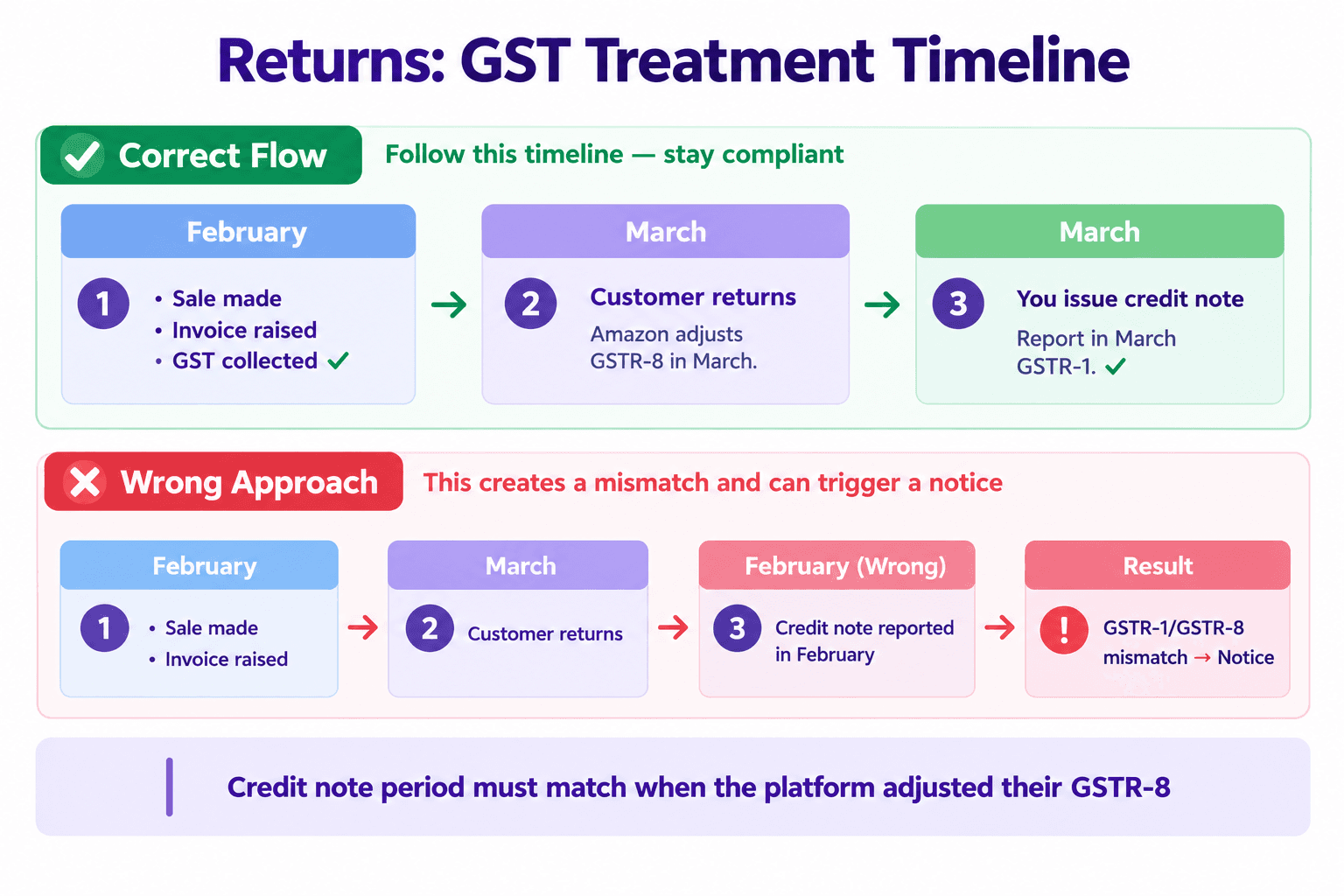
Amazon's GSTR-8 is based on net sales — gross sales minus returns. If a customer returns in March but the original sale was in February, Amazon adjusts their GSTR-8 in March.
Your GSTR-1 must report the credit note in March — not February. If you report it in February (the month of original sale), your GSTR-1 and Amazon's GSTR-8 will be in different periods — creating a mismatch that triggers an automated scrutiny notice.
Rule: Always match your credit note period to when the platform adjusted their GSTR-8 — not when the original sale occurred.
Part 7: Monthly GST Compliance Checklist for E-Commerce Sellers
Use this every month without exception:
By 5th of the month:
[ ] Download MTR from Amazon Seller Central for previous month
[ ] Download settlement and tax report from Flipkart Seller Hub
[ ] Download payout report from Meesho Supplier Panel
[ ] Identify all returns and cancellations across platforms
By 10th of the month:
[ ] Go to GST portal → TDS and TCS Credit Received → Accept TCS from all platforms
[ ] Verify TCS amount accepted matches what platforms deducted in settlement reports
[ ] Check GSTR-2B for platform commission invoices → verify ITC available
[ ] Create credit notes for all returns from the previous month
By 11th of the month (GSTR-1 deadline):
[ ] Consolidate sales from all platforms into one GSTR-1
[ ] Classify each sale as B2B (buyer GSTIN exists) or B2C
[ ] Apply correct tax head — IGST (inter-state) or CGST+SGST (intra-state)
[ ] Include credit notes for returns in the correct tables
[ ] File GSTR-1
By 20th of the month (GSTR-3B deadline):
[ ] Calculate total GST collected (from GSTR-1)
[ ] Deduct ITC on inventory, commission, packaging, advertising
[ ] Deduct TCS credit accepted earlier this month
[ ] Pay net GST liability
[ ] File GSTR-3B
Monthly — always:
[ ] Even if zero sales — file nil GSTR-1 and nil GSTR-3B to avoid ₹20/day late fee

Common GST Mistakes E-Commerce Sellers Make — and the Consequences
Mistake | What Goes Wrong | Consequence |
No GST registration before first sale | Non-compliant sales from Day 1 | Penalty ₹10,000 or 100% of tax + account suspension |
Not accepting TCS credits monthly | Money sitting unclaimed in government account | Overpaying GST in cash every month |
Recording settlement amount as revenue | Wrong sales figure, wrong GST | GSTR-1 vs GSTR-3B mismatch → DRC-01C notice |
Skipping credit notes for returns | GSTR-1 overstates actual sales | Mismatch with Amazon's GSTR-8 → scrutiny notice |
Wrong tax head (IGST vs CGST+SGST) | Tax in wrong column | Demand notice for underpayment in correct head |
Not filing nil returns when zero sales | Non-filing penalty | ₹20/day late fee, month after month |
Missing ITC on platform commissions | Overpaying net GST | Losing ₹20,000–₹30,000+/month in claimable credit |
Filing credit note in wrong period | Period mismatch with platform's GSTR-8 | Automated mismatch notice |
How hisabkitab Makes GST Compliance Automatic for E-Commerce Sellers
hisabkitab's e-commerce accounting feature handles every step above automatically:
Auto-import of platform reports: Connect Amazon, Flipkart, and Meesho — settlement reports import automatically. No manual download.
Auto-classification of every sale: IGST or CGST+SGST applied automatically based on buyer state. B2B vs B2C classified based on buyer GSTIN presence.
TCS tracking and reconciliation: TCS credits are tracked per platform and matched against what appears on the GST portal — flagging any discrepancy before you file.
Credit notes auto-generated: Every return flagged in settlement reports generates a credit note in the correct period — automatically matched to the platform's GSTR-8 timing.
GSTR-1 auto-prepared: From consolidated multi-platform data, GSTR-1 is populated across all relevant tables — with MTR data already mapped to the right table numbers.
Net GST liability calculated: ITC on commission, TCS credit, and net payable calculated in one view — before you file GSTR-3B.
Filing reminders via WhatsApp: Reminder on the 9th (GSTR-1 due in 2 days) and 18th (GSTR-3B due in 2 days) — so you never pay a late fee again.
Start your 7-day free trial — no credit card required: hisabkitab.co Built by CAs. Trusted by 10,000+ Indian businesses.
Continue Reading
