



Every Amazon and Flipkart seller notices it.
You sold ₹2,00,000 worth of products this month. Your settlement shows ₹1,90,000. There's a ₹2,000 line item that says "TCS" — and you have no idea what it is, where it went, or whether you'll ever see it again.
Here is the good news: that money is yours. It is sitting in a government account right now — waiting for you to claim it. The bad news: most sellers never do.
In a survey of Indian e-commerce sellers by a leading GST compliance platform in 2025, over 60% of sellers with monthly GMV below ₹10 lakh had never claimed their TCS credits. On ₹5 lakh monthly GMV at the current 0.5% TCS rate, that's ₹2,500 every month — ₹30,000 every year — sitting idle.
This guide explains exactly what TCS is, how it is calculated, why it appears in your settlement, and the precise steps to claim every rupee back.
Calculate your GST liability and TCS offset before filing: hisabkitab.co/gst-calculator-online
The Rate Most Blogs Are Still Getting Wrong
Before anything else — a critical update that most articles have missed:
The TCS rate changed from 1% to 0.5% effective 10 July 2024.
Under CBIC Notification No. 15/2024-Central Tax dated 10 July 2024, the GST TCS rate under Section 52 was reduced from 1% to 0.5% of the net taxable value of supplies.
Period | TCS Rate | Intra-state | Inter-state |
Before 10 July 2024 | 1% | 0.5% CGST + 0.5% SGST | 1% IGST |
From 10 July 2024 onwards | 0.5% | 0.25% CGST + 0.25% SGST | 0.5% IGST |
If you are reading a blog that says TCS is 1% — it has not been updated since July 2024. The current rate is 0.5%.
This rate reduction means:
On ₹10,00,000 monthly GMV: TCS was ₹10,000 before July 2024, now ₹5,000
On ₹50,00,000 monthly GMV: TCS was ₹50,000 before July 2024, now ₹25,000
More money stays in sellers' hands. But you still need to actively claim it.

What is TCS?
TCS stands for Tax Collected at Source.
When you sell a product on Amazon, Flipkart, or Meesho, the platform collects the full payment from the customer — including GST. Before depositing your share, the platform deducts 0.5% of your net taxable sales as TCS and deposits it directly to the government on your behalf.
Think of it like this: The government doesn't trust millions of individual sellers to always pay their GST on time. So it puts the marketplace — Amazon, Flipkart, Meesho — in charge of collecting a small advance from every payment before the seller even sees it.
That advance is TCS. It is not a fee. It is not a penalty. It is not income for the platform. It is your advance GST payment — deposited by the platform to the government — that you get back every month when you file your GSTR-3B.
The legal basis — Section 52 CGST Act 2017
TCS for e-commerce is governed by Section 52 of the Central Goods and Services Tax Act 2017. It mandates that every e-commerce operator (Amazon, Flipkart, Meesho, Myntra, Snapdeal, and any platform that collects payment on behalf of sellers) must:
Collect TCS at 0.5% of the net value of taxable supplies made through their platform
Deposit the collected TCS to the government by the 10th of the following month
File Form GSTR-8 (TCS return) by the 10th of the following month — reporting each seller's GSTIN and the TCS collected against them
This is not optional for the platform. Amazon and Flipkart are legally required to do this for every seller on their marketplace.

How TCS is Calculated - Step by Step with Real Numbers
The TCS calculation is not on the full invoice amount. It is on the net taxable value — meaning the sale price excluding GST.
Step-by-step calculation
Example: A seller on Flipkart sells a product at ₹1,000 (inclusive of 5% GST)
Step 1 — Find the base taxable value: ₹1,000 ÷ 1.05 = ₹952.38 (taxable value, ex-GST)
Step 2 — Calculate TCS at 0.5%: ₹952.38 × 0.5% = ₹4.76 (rounded to ₹5)
Step 3 — Flipkart's deduction before paying you: ₹1,000 (customer payment) Less: Flipkart commission (say 12%): ₹114 Less: TCS at 0.5%: ₹5 Less: Shipping fee: ₹45 Less: GST on commission at 18%: ₹20.52 = ₹815.48 deposited to your bank
Step 4 — Flipkart deposits the ₹5 TCS to the government by 10th of next month, filing GSTR-8 with your GSTIN
Step 5 — The ₹5 appears in your GST portal Electronic Cash Ledger — waiting for you to claim it
At scale - what TCS adds up to
Monthly GMV | Net Taxable Value (approx) | TCS at 0.5% | Annual TCS |
₹1,00,000 | ₹95,000 | ₹475/month | ₹5,700/year |
₹5,00,000 | ₹4,75,000 | ₹2,375/month | ₹28,500/year |
₹10,00,000 | ₹9,50,000 | ₹4,750/month | ₹57,000/year |
₹25,00,000 | ₹23,75,000 | ₹11,875/month | ₹1,42,500/year |
₹50,00,000 | ₹47,50,000 | ₹23,750/month | ₹2,85,000/year |
On ₹10 lakh monthly GMV — ₹57,000 per year. On ₹25 lakh monthly GMV — ₹1,42,500 per year. This is not a trivial amount. And every rupee of it is yours.

Where TCS Appears — Platform by Platform
Every major Indian marketplace deducts TCS. Here is how it appears on each platform's settlement report:
Amazon Seller Central
Go to Payments → Transaction View
Filter by "Service Fee" type: TCS appears as "TaxCollection" line items
The Monthly Tax Report (MTR) also shows TCS deducted per order
Amazon files GSTR-8 by the 10th of the following month — TCS appears in your GST portal immediately after
Flipkart Seller Hub
Go to Finance → Payment Details
TCS appears as a separate line item in every settlement statement: "GST TCS Deducted"
Flipkart's monthly tax statement consolidates total TCS for the month
Meesho Supplier Panel
Go to Payments → Settlement Reports
TCS is labelled as "Tax Collected at Source" in Meesho's payment breakdown
Meesho's settlement reports are weekly — TCS across all weekly settlements should be summed for the monthly claim
What to do if TCS is not showing in your settlement report
If you are selling on a marketplace and TCS is not being deducted, it means either:
The platform has classified your supplies under Section 9(5) — where the platform pays GST directly instead of collecting TCS (common for certain transport and accommodation services)
Your supplies are GST-exempt — no TCS on zero-rated or exempt goods
There is a GSTIN error in your seller account — the TCS may be getting deposited against a different GSTIN
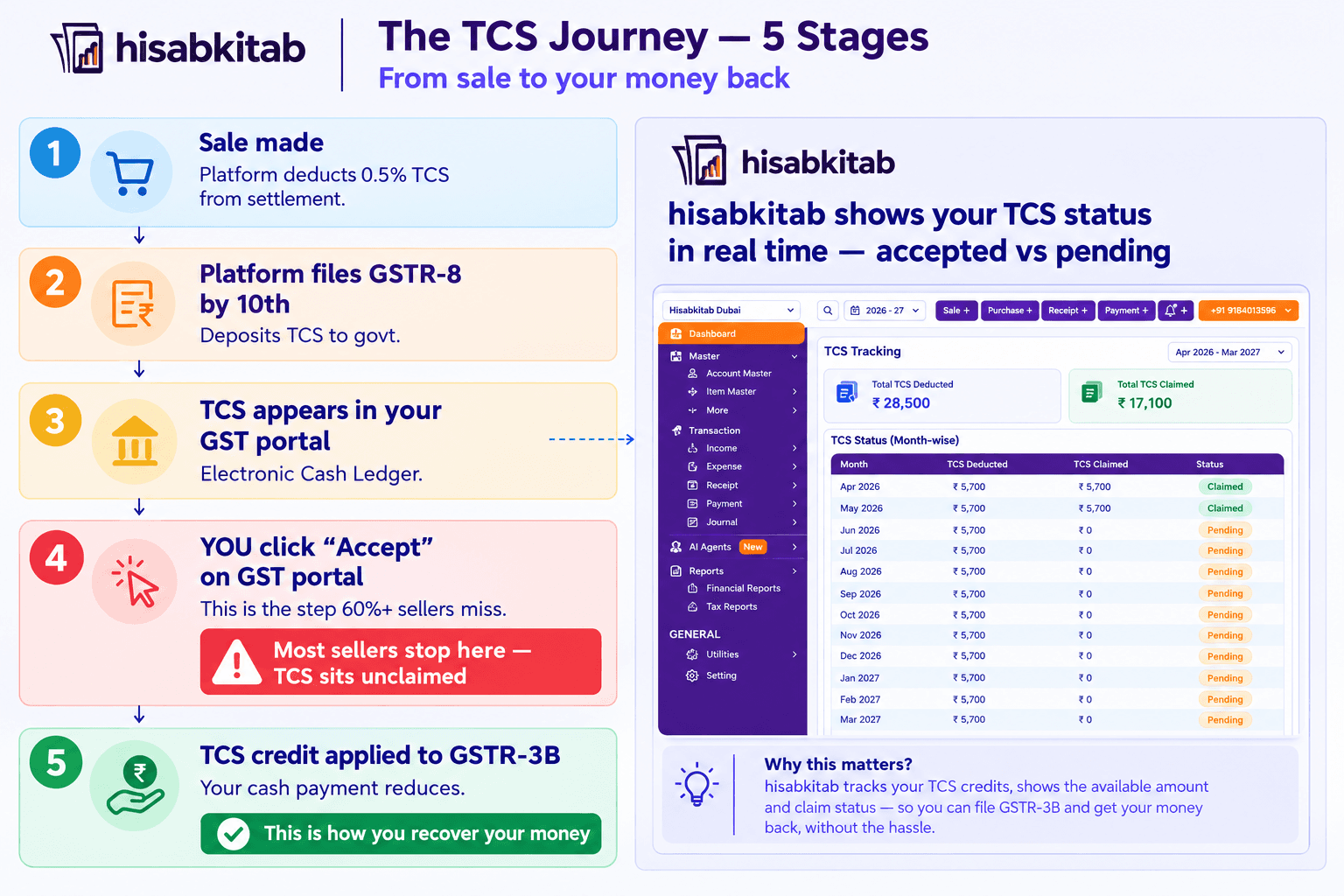
The Journey of Your TCS Money — From Deduction to Your Pocket
Understanding this flow is what separates sellers who claim every rupee from sellers who leave thousands on the table every year.
Stage 1 — Sale and deduction (by you and the platform)
Customer places an order. Platform collects payment. Platform deducts 0.5% TCS from the net taxable value of your sale. You receive your settlement minus the TCS amount.
Stage 2 — Platform deposits TCS (by 10th of following month)
Amazon/Flipkart/Meesho files Form GSTR-8 for the previous month — listing your GSTIN, your total taxable supplies, and the TCS collected against you. They deposit the TCS to the government simultaneously.
Stage 3 — TCS appears in your GST portal (automatic)
Once the platform files GSTR-8, the TCS credit automatically appears in your Electronic Cash Ledger on the GST portal. You can see it — but it has not been applied to your liability yet.
Stage 4 — You accept the TCS credit (THIS IS THE STEP MOST SELLERS MISS)
The TCS credit does not automatically offset your GST liability. You must manually accept it on the GST portal. Without this step, the credit sits in a holding state — visible but unusable.
Stage 5 — TCS credit reduces your GSTR-3B cash payment
Once accepted, the TCS credit moves to your main Electronic Cash Ledger and offsets your GST liability when you file GSTR-3B. Your cash payment reduces by exactly the TCS amount accepted.
How to Claim TCS — Step-by-Step on the GST Portal
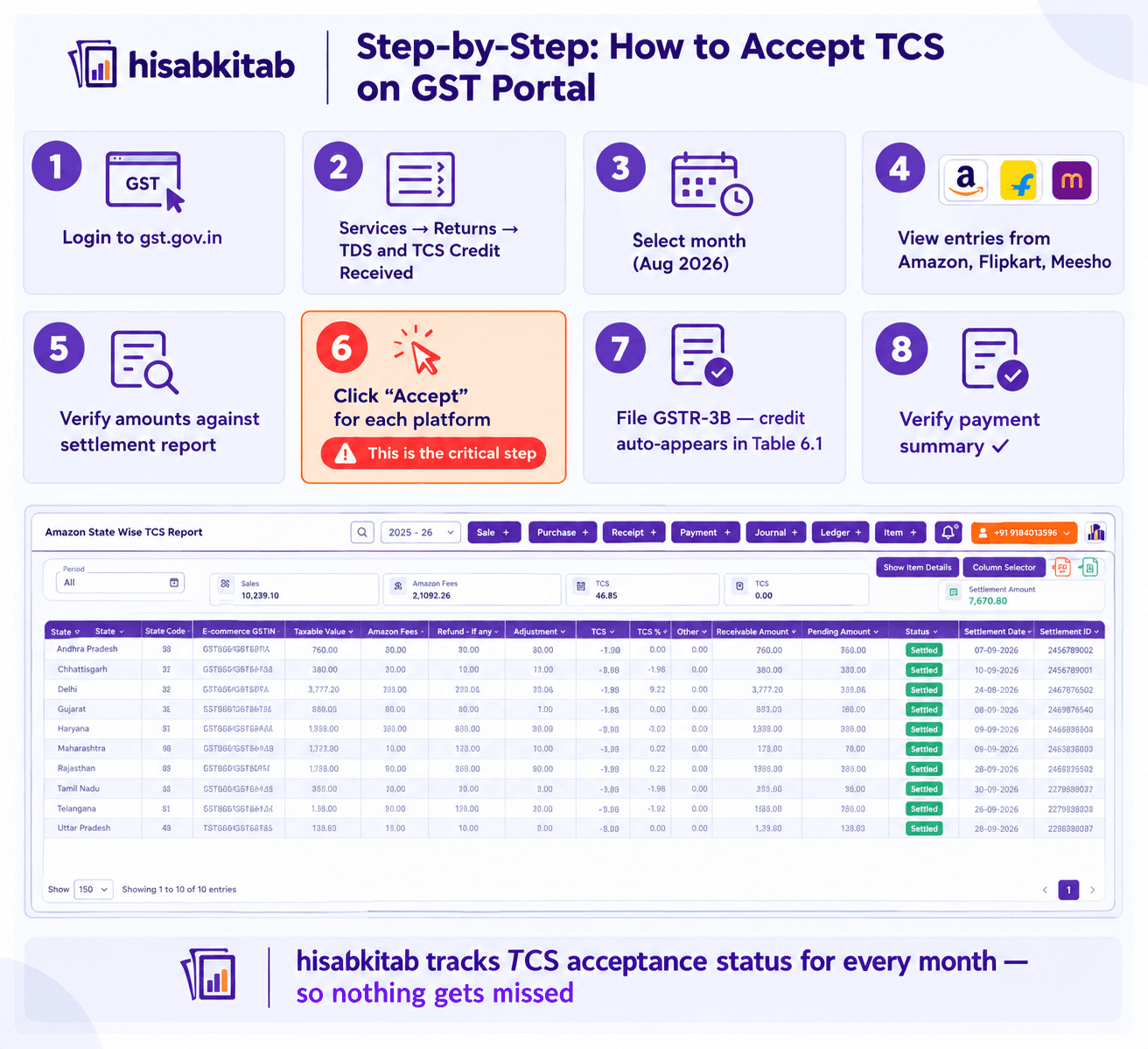
This is the exact process. Follow it every month between the 10th and 20th — after the platform files GSTR-8 and before you file GSTR-3B.
Step 1 — Log into the GST portal
Go to gst.gov.in → Log in with your GSTIN and password
Step 2 — Navigate to TCS Credit
Go to Services → Returns → TDS and TCS Credit Received
Step 3 — Select the tax period
Choose the month you want to claim TCS for. Example: August 2026.
Step 4 — View the TCS entries
You will see a list of TCS deposited against your GSTIN — one entry per platform (Amazon, Flipkart, Meesho each file separately). Each entry shows:
Name of the e-commerce operator
GSTIN of the operator
Total taxable supplies they reported
TCS amount (CGST, SGST, IGST split)
Step 5 — Verify the amounts
Cross-check the TCS amount shown on the portal against your settlement reports for the same month. They should match. If there is a discrepancy — note it (see "What to do if TCS amounts don't match" section below).
Step 6 — Click "Accept"
For each platform entry, click the "Accept" button. This moves the TCS from the holding state into your active Electronic Cash Ledger.
Step 7 — File GSTR-3B
When you file GSTR-3B, the accepted TCS credit automatically appears in Table 6.1 — Tax Paid as a credit — reducing your net cash payment.
Step 8 — Verify in your payment summary
After filing GSTR-3B, check the payment summary. The TCS credit should appear as an offset against your GST liability — reducing the cash amount you paid.
What to Do If TCS Amounts Don't Match
This happens more often than sellers realise — and it has a specific cause and fix.
Cause 1 — Platform filed GSTR-8 with wrong GSTIN
The platform may have your old GSTIN on file (if you updated it recently) or may have made a data entry error. TCS is deposited against a GSTIN that doesn't match yours — so it doesn't appear in your portal.
Fix: Compare your settlement report TCS amount with what the GST portal shows. If there's a gap, raise a case with the platform's seller support. Provide your GSTIN and the exact amount — the platform must file a correction in their next GSTR-8.
Cause 2 — Platform filed GSTR-8 late
Platforms must file GSTR-8 by the 10th. If they file late, your TCS credit appears after their actual filing date — sometimes after you've already filed GSTR-3B. In this case, claim the credit in the following month's GSTR-3B.
Fix: Check the portal again after the 15th. Late filing by platforms is rare for Amazon and Flipkart but can happen for smaller marketplaces.
Cause 3 — Returns adjusted the TCS amount
If a customer returned a product after the platform filed GSTR-8, the TCS on that return may be adjusted in the following month's GSTR-8. Your portal may show a lower amount than your settlement report for the current month.
Fix: Track returns separately in your accounting records. hisabkitab's e-commerce module flags TCS adjustments on returns automatically — showing the net TCS claimable after return deductions.
Cause 4 — Your GSTIN was not active at time of sale
If your GST registration was suspended or cancelled for any period, TCS cannot be deposited against your GSTIN during that time. The TCS effectively becomes unrecoverable for that period.
Fix: Maintain active GST registration at all times. Set a reminder 30 days before your registration renewal or any compliance action that might affect registration status.
TCS vs TDS — The Two Deductions That Sellers Confuse
Most sellers don't realise there are two separate deductions happening simultaneously from their e-commerce sales.
TCS — GST | TDS — Income Tax | |
Full form | Tax Collected at Source | Tax Deducted at Source |
Governed by | Section 52, CGST Act 2017 | Section 194O, Income Tax Act |
Rate | 0.5% of net taxable value | 0.1% of gross sales |
Deducted by | E-commerce platform | E-commerce platform |
Deposited by | Platform by 10th of next month | Platform by 7th of next month |
Appears in | GST portal — Electronic Cash Ledger | Form 26AS / AIS on Income Tax portal |
Claimed in | GSTR-3B (monthly GST return) | ITR (annual Income Tax Return) |
Nature | Advance GST | Advance Income Tax |
On ₹10,00,000 monthly GMV (at 18% average GST rate):
Net taxable value: ~₹9,50,000
TCS at 0.5%: ₹4,750 → claim in GSTR-3B
TDS at 0.1% on gross ₹10,00,000: ₹1,000 → claim in ITR
Total deducted by platforms monthly: ₹5,750
Both must be tracked and claimed through separate channels. Missing either is leaving real money on the table.

How hisabkitab Tracks and Automates TCS for E-Commerce Sellers
Manual TCS tracking has three failure points: forgetting to log in and accept, missing a mismatch between settlement and portal, and losing track of which months have been claimed and which haven't. hisabkitab eliminates all three.
Automatic TCS detection from settlement reports When you import your Amazon, Flipkart, or Meesho settlement report into hisabkitab, the system automatically identifies the TCS line item, records it as a receivable (not an expense), and adds it to your monthly TCS tracking ledger.
Monthly TCS status dashboard hisabkitab shows you the TCS status for every month in one view:
TCS deducted (from settlement report)
TCS accepted (from GST portal)
TCS claimed (in GSTR-3B)
Any discrepancy between settlement and portal amounts — flagged automatically
WhatsApp reminder before GSTR-3B deadline hisabkitab sends a WhatsApp reminder on the 18th of every month: "Your GSTR-3B is due on the 20th. TCS credit for [month]: ₹X is ready to claim.GSTR-3B pre-filled with TCS offset When hisabkitab prepares your GSTR-3B, it automatically includes the accepted TCS credit in Table 6.1 — reducing your net cash payment. You don't manually enter the TCS amount.
Start your 7-day free trial — no credit card required: hisabkitab.co Built by CAs. Trusted by 10,000+ Indian businesses.
Monthly TCS Checklist — Do This Every Month
Between 10th and 15th (after platform files GSTR-8):
[ ] Log into GST portal → Services → Returns → TDS and TCS Credit Received
[ ] Select the previous month
[ ] Check TCS entries from all platforms — Amazon, Flipkart, Meesho
[ ] Verify each entry against your settlement report
[ ] Click "Accept" for each verified entry
[ ] Note any discrepancy — raise with platform seller support immediately
Between 15th and 20th (before GSTR-3B filing):
[ ] Confirm all TCS credits have been accepted and moved to Electronic Cash Ledger
[ ] Include TCS credit in your net GST payable calculation
[ ] File GSTR-3B with TCS offset applied
[ ] Verify payment summary shows TCS credit used correctly
Monthly records to maintain:
[ ] Settlement report TCS amount per platform
[ ] GST portal accepted TCS amount per platform
[ ] Any discrepancies and their resolution status
[ ] Cumulative TCS claimed YTD
Continue Reading
