Industry playbook
Electronics & home appliance retailers
How electronics and appliance stores automate serial tracking, billing and GST with hisabkitab
Picture a multi-brand electronics and home appliance store selling TVs, air conditioners, refrigerators, washing machines and small appliances. It runs two counters, takes consumer-finance and card payments, delivers and installs at customer homes, and buys from several brand distributors with schemes and rebates.
See hisabkitab for Electronics & home appliance retailers →
The challenges
What makes appliance retail hard to account for
Every unit has a serial number
Warranty claims, returns and service calls all start with 'which unit did you sell me?'. When the serial number lives on a paper delivery slip, finding it during a warranty dispute wastes time and sometimes costs the store a replacement it did not owe.
Sales paid three different ways
One AC sale might be part cash, part card and the rest through a consumer-finance company that pays days later. Matching what the customer paid, what the financier settled and what the bank shows becomes a monthly headache.
Distributor schemes and price drops
Brands run cashback, price protection and target schemes that arrive as credit notes weeks later. Without tracking them, the store cannot tell whether a model was really sold at a profit.
Seasonal stock risk
ACs and coolers peak in summer, heaters in winter, TVs around festivals. Overstock ties up cash; understock loses the season. Most owners decide purely from memory because model-wise stock and sales are buried in the books.
Delivery and installation follow-up
Big appliances are delivered and installed later, sometimes by brand technicians. Without the delivery status and installation date on record, customer complaints and warranty start dates get disputed.
A day in the life
A day before vs after hisabkitab
Before
Serial numbers are written on the delivery slip and filed in a box.
Finance company settlements are matched against sales by scrolling the bank statement.
Scheme credit notes from distributors are filed but not linked to the models sold.
Re-ordering for the season is decided from memory and a quick look at the godown.
With hisabkitab
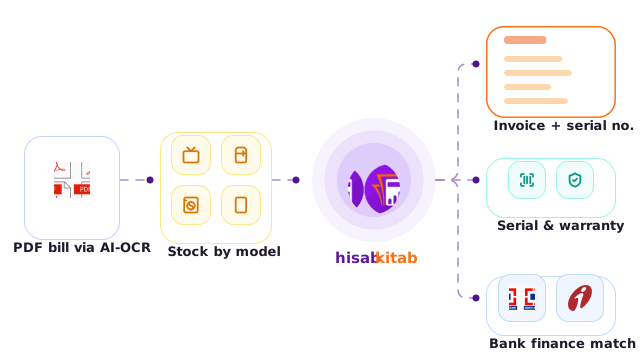
Serial or model number is captured on the invoice as a custom field and searchable in seconds.
Finance company dues sit in their own ledger, and AI bank statement import matches settlements.
Distributor credit notes post against the supplier ledger, so true model profit shows in reports.
Top and least selling item reports guide seasonal ordering by category, brand and model.
Solutions
How hisabkitab solves it
Lost serial numbers
Custom Field (Item Level / Transaction level) + Serial No Tracking Report
Record serial number and warranty period on each sale. On Advanced the Serial No Tracking Report traces any unit from purchase to sale; on Boost the serial sits on the invoice and is searchable.
Split payments and finance companies
Receipt vouchers + separate financier ledgers
Record the down payment as a receipt from the customer and the financed portion as receivable from the finance company. Customer and Supplier Outstanding reports show what each financier still owes.
Bank matching
OCR Bank Statement Import (AI)
Upload the bank statement; AI reads and classifies card settlements and financier credits and suggests the matching ledger. You approve, and the entries post. AI does the first 90%; you review the rest.
Scheme and price-protection credits
Credit/Debit Notes + Bill-wise Profit Report
Post brand scheme credits against the supplier and model. Bill-wise and item-wise profit then reflect the real margin after schemes.
Seasonal stock decisions
Top / Least Selling Items Reports + 4-level grouping
Group Category → Brand → Model → Variant. See what sold last season by model and what is still lying in stock before placing the next order.
Delivery and installation
Delivery Challan + Custom Field (Transaction level)
Use delivery challans for home deliveries and capture Installation Date and Technician as fields, so warranty start dates are on record.
Inside the software
Built for your books
Custom formula example
4-level grouping
Items: Air Conditioners → Brand A → 1.5 Ton Split → 5-star Inverter. Customers: Area → Channel (Walk-in / Finance) → Salesman → Party.
Reports you’ll use
Serial No Tracking Report · Top Selling Items Report · Least Selling Items Report · Item-wise Profit Report · Customer Outstanding Report · Cash/Bank Report
Compliance notes
After the September 2025 rationalisation, many large appliances such as air conditioners and televisions moved to the 18% slab, but confirm the HSN and current rate for each category. Business buyers need their GSTIN on the invoice to claim credit, and stores above the e-invoicing threshold must generate an IRN for B2B bills. Inter-state stock transfers or deliveries above ₹50,000 need an e-way bill.
Recommended plan
The plan that fits
Advanced
₹6,999/year, exclusive of 18% GST (or ₹13,999 for 3 years)
Serial No Tracking Report, AI bank statement import for card and finance settlements, and Top/Least Selling reports are on Advanced. A single-counter store that only needs serial numbers on the bill can start on Boost.
FAQs
Frequently asked questions
Can I find which customer bought a specific serial number?
Yes. Record the serial number on the sale as a custom field and search for it. On Advanced, the Serial No Tracking Report shows the full journey of each unit, from the supplier bill it arrived on to the invoice it left on, which settles warranty disputes in minutes.
How do I record a sale financed by a consumer-finance company?
Record the customer's down payment as a receipt, and treat the financed amount as receivable from the finance company's ledger. When the financier settles, the bank receipt clears that balance. Outstanding reports show exactly how much each financier still owes you.
Can hisabkitab read my bank statement automatically?
On Advanced, upload a PDF or scanned statement from banks such as HDFC, ICICI, SBI, Axis or Kotak. AI extracts each line, suggests the ledger and posts after your one-click approval. It handles most lines correctly, and you review the rest; it also learns from your corrections.
How do I track brand schemes and price protection?
Post scheme credits as credit notes from the distributor, linked to the relevant models. Bill-wise and Item-wise Profit Reports then show the real margin after schemes, which tells you whether a festive offer was worth running. It also shows which brands' schemes actually reach your bottom line.
Can I sell from two counters and see stock live?
Yes. Boost includes four users and Advanced five, with more available as add-ons. Both counters bill into the same company in real time, so stock reduces as soon as a unit is sold and both counters always see the same availability.
Every serial number, every scheme, one screen
Book a demo and see a sample AC sale travel from distributor bill to customer invoice with serial number, finance split and warranty date on record.
